Steps
Wrap each unit of work in a step and it runs once: the result is saved, it retries on its own, and the run resumes from it after a crash.
Steps are how a workflow does durable work. Each step runs once, its result is saved, and it becomes a checkpoint the workflow can resume from. Wrap every unit of real work in a step.
Every step takes a unique id as its first argument; Duraton keys the saved result by it.
| Method | Returns | Purpose |
|---|---|---|
step.run(id, fn) | the fn's value | Run a function once and memoize its result. |
step.skip(id, reason?) | void | Record a deliberately bypassed step as terminal skipped (with an optional reason). |
step.sleep(id, duration) | void | Pause durably for a duration. |
step.sleepUntil(id, at) | void | Pause durably until an absolute time. |
step.waitForEvent(id, opts) | the event payload, or null | Pause until a named event arrives or the timeout elapses. |
step.poll(id, probe, opts) | the ready value | Re-check an external resource until it is ready, without spending the step's retry budget. |
step.runWorkflow(id, opts) | the child's result | Invoke another workflow as a child run and wait for it. |
step.emit(id, opts) | void | Publish an event from inside a run. |
step.approval(id, opts) | the decision | Park the run until a human approves or rejects. See Approvals. |
step.ai.* | the call's result | Model calls as durable, metered steps: generate, wrap, embed, loop, infer. See AI steps. |
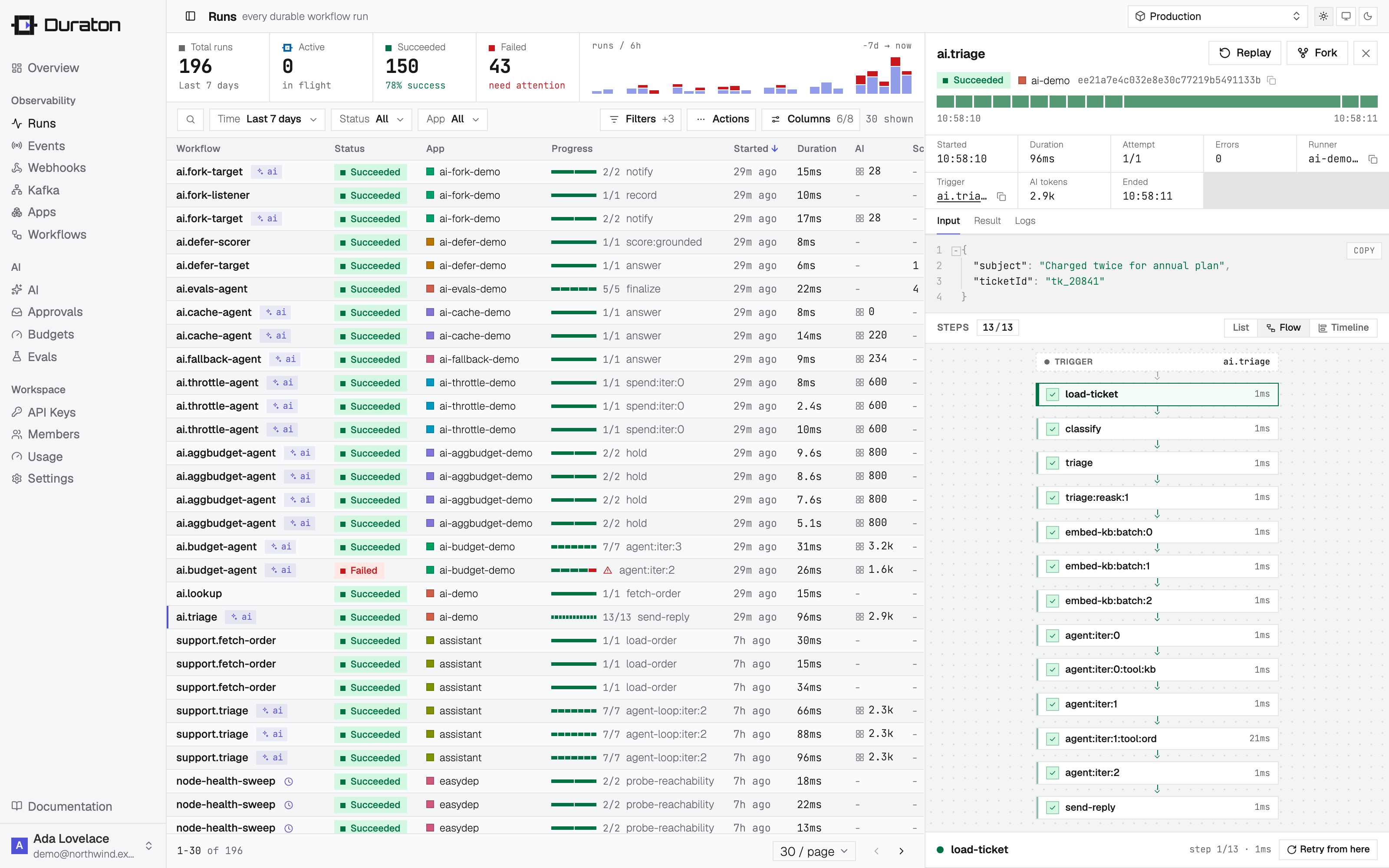
The console renders a run's steps three ways - a list, a flow graph, and a timeline on a
shared time axis, where a long sleep or waitForEvent shows as a gap and parallel steps overlap.
step.run
Run a function once and remember its result.
const triage = await ctx.step.run("triage", () => triageTicket(ticket));triage = await ctx.step.run("triage", lambda: triage_ticket(ticket))triage, err := duraton.Run(c, "triage", func() (Triage, error) {
return triageTicket(ticket)
})The first time, the function runs and its return value is saved. On any later pass, step.run
returns the saved value without running the function again. The return value is whatever your
function returns (it must be JSON-serializable, since it's stored).
Put anything with a side effect or a changing result inside a step.run - API calls, database
writes, payments, reading the clock. See Durable execution for
why.
Recording a step's input
Pass an explicit input to record it on the step, so it shows on the console's Input tab. In TypeScript and Go the same value is also handed to the function; in Python the function reads what it needs from its closure:
const triage = await ctx.step.run("triage", { ticketId, amount: 4200 }, (input) =>
  triageTicket(input.ticketId, input.amount),
);
triage = await ctx.step.run(
"triage",
lambda: triage_ticket(ticket_id, 4200),
{"ticket_id": ticket_id, "amount": 4200},
)type TriageInput struct {
TicketID string `json:"ticketId"`
Priority string `json:"priority"`
}
triage, err := duraton.RunInput(c, "triage", TriageInput{TicketID: ticketID, Priority: "high"},
func(i TriageInput) (Triage, error) {
return triageTicket(i.TicketID, i.Priority)
})The recorded input shows on the step's Input tab in the console. It is optional: the bare
step.run(id, fn) form captures no input (its arguments live in the function's closure, which Duraton cannot see). The structural steps below record their input automatically - a runWorkflow's
child input, an emit's payload, a waitForEvent's event and timeout, a sleep's duration - so the
Input tab is backed wherever a step has a meaningful input.
step.skip
Record a step you deliberately bypassed. Without it, a conditionally-omitted step simply never
appears, so a stage you chose not to run is indistinguishable from one that never existed. step.skip
records a terminal skipped step - with an optional reason - so the bypass is visible in the run's
steps, the flow graph, and the timeline.
if (triage.priority !== "high") {
  await ctx.step.skip("page-on-call", "not high priority");
} else {
  await ctx.step.run("page-on-call", () => pageOnCall(ticket));
}
The reason is stored as the step's output. step.skip is durable and replay-safe (the id must be
stable across replays), and is available in the TypeScript SDK.
step.sleep
Pause the workflow for a duration. The wait is durable: the process can restart during it and the run still wakes up on time.
await ctx.step.sleep("wait-for-settlement", "1h");await ctx.step.sleep("wait-for-settlement", "1h")err = duraton.Sleep(c, "wait-for-settlement", time.Hour)The duration is a string like "10s", "5m", "1h", or a number of milliseconds. Sleeps can be
short or span days - Duraton owns the schedule, so nothing has to stay running in the meantime.
step.sleepUntil
Pause until an absolute instant rather than for a relative duration. Use it when the wake time is a fixed wall-clock target - midnight, a billing date, a scheduled send.
await ctx.step.sleepUntil("resume-on-renewal", subscription.renewsAt);await ctx.step.sleep_until("resume-on-renewal", subscription.renews_at)err = duraton.SleepUntil(c, "resume-on-renewal", subscription.RenewsAt)| Argument | Type | Description |
|---|---|---|
at | Date | string | number | The absolute wake time: a Date, an ISO 8601 string, or epoch milliseconds. |
Reach for sleep when you mean "wait this long" and sleepUntil when you mean "wait until this
moment." Computing target - Date.now() to fake an absolute wait is wrong: it reads the clock outside
a step. A target already in the past wakes immediately.
step.waitForEvent
Pause until a named event arrives, or until the timeout elapses. Returns the event's data on arrival,
or null on timeout.
const approval = await ctx.step.waitForEvent("await-approval", {
  event: "ticket.approved",
  timeout: "24h",
});
if (approval === null) return { status: "expired" };
approval = await ctx.step.wait_for_event(
"await-approval", event="ticket.approved", timeout="24h"
)
if approval is None:
return {"status": "expired"}approval, err := duraton.WaitForEvent[Approval](c, "await-approval", duraton.WaitForEventOptions{
Event: "ticket.approved",
Timeout: 24 * time.Hour,
})
if err != nil {
return nil, err
}| Option | Type | Description |
|---|---|---|
event | string | The event name that resumes this step. |
timeout | string | number | How long to wait before resolving to null. |
if | string | Optional CEL predicate on the event payload. The run resumes only on an event whose name matches and whose payload satisfies if. |
An incoming event resumes every run waiting on that name. An event that arrives shortly before the
run parks still wakes it: on parking, the step also looks back over recently-received events and
resumes immediately if a matching one already arrived. This closes the race where a fast responder
emits its event before the waiting run reaches its waitForEvent, so a request/response pattern never
waits out its full timeout just because the reply came back first.
The look-back is bounded: only events received within a short window before the park - 60 seconds -
and never older than the run itself are considered, and the same if predicate below still applies, so
a stale or unrelated event of the same name never wakes the wrong run. The window is fixed platform-wide
and is not a per-call, per-workflow, or per-project knob.
Correlated waits
Use if to wait for the event that belongs to this run, rather than any event of that name. The
predicate uses the same CEL dialect as event trigger filters -
event.name and event.data are in scope:
const payment = await ctx.step.waitForEvent("await-payment", {
  event: "payment.settled",
  timeout: "1h",
  if: `event.data.ticketId == "${ticketId}"`,
});
Without if, correlating a wait to a specific entity forces the id into the event name
(payment.settled.<ticketId>), which explodes event-name cardinality. The filter keeps one stable
event name and matches on the payload instead.
The if predicate is available in the TypeScript SDK today. Python and Go SDK support is on the
roadmap; until then, those SDKs match on the event name only.
step.poll
Re-check an external resource until it is ready. A resource that is still provisioning is not a
failure - it is a normal intermediate state - so step.poll re-checks on a fixed interval without
spending the step's retry budget, and gives up after an overall deadline.
Pass a probe that reads the resource and returns its value once ready, or a "not ready yet" signal
otherwise. Between checks the run is suspended durably, exactly like step.sleep - it holds no worker
and survives a restart. On the first ready check step.poll resolves with the value.
Each check is two durable steps, not a free suspension: a step.run probe call plus a step.sleep
gap. A short every against a long timeout produces one checkpoint pair per interval - for example
every: "5s" over a timeout: "10m" is up to 120 checks, so 240 durable steps. Prefer the widest
every the resource's provisioning time tolerates.
const record = await ctx.step.poll("provision", () => fetchRecordOrNull(), {
  every: "5s",
  timeout: "10m",
  until: (v) => v != null,
});
record = await ctx.step.poll(
"provision", probe, every="5s", timeout="10m", until=lambda v: v is not None
)record, err := duraton.Poll(c, "provision", func() (*Record, bool, error) {
rec, err := fetchRecord()
return rec, rec != nil, err // (value, ready, err): ready=false re-checks
}, duraton.PollOpts[*Record]{Every: 5 * time.Second, Timeout: 10 * time.Minute})A probe that returns a value (or one that satisfies until) means ready. A probe that returns
null/undefined (or one until rejects) means not ready: the run waits every and checks
again. In Go the probe returns (value, ready, err), where ready is false to re-check, and
Every/Timeout are time.Duration values passed on PollOpts[T].
| Option | Type | Description |
|---|---|---|
every | string | number | Delay between checks - a duration string like "5s" or a number of milliseconds. |
timeout | string | number | Overall deadline for the whole wait. Once it passes, step.poll gives up. |
until | (value) => boolean | Optional readiness predicate. When omitted, a non-null value is treated as ready. |
maxChecks | number | Optional cap on the number of checks, as a safety bound. |
A probe that throws is a real error, not a "not ready" signal: it retries under the normal step retry policy and, if it exhausts its attempts, fails the run. Readiness (a "not ready" return) and failure (a throw) stay fully separate, so waiting for a resource never consumes the retry budget reserved for genuine errors.
When the deadline passes
If the resource is still not ready when timeout elapses, step.poll throws PollTimeoutError and
the run fails, routing to onFailure if one is declared. Giving
up on a required resource is a genuine failure, so this is the default.
To treat "not ready in time" as a normal branch rather than a failure, catch it:
import { PollTimeoutError } from "@duraton/sdk";

try {
  const record = await ctx.step.poll("provision", () => fetchRecordOrNull(), {
    every: "5s",
    timeout: "10m",
  });
  return { status: "ready", record };
} catch (err) {
  if (err instanceof PollTimeoutError) return { status: "still-provisioning" };
  throw err;
}
from duraton import PollTimeoutError
try:
record = await ctx.step.poll("provision", probe, every="5s", timeout="10m")
return {"status": "ready", "record": record}
except PollTimeoutError:
return {"status": "still-provisioning"}record, err := duraton.Poll(c, "provision", probe, duraton.PollOpts[*Record]{Every: 5 * time.Second, Timeout: 10 * time.Minute})
var timedOut *duraton.PollTimeoutError
if errors.As(err, &timedOut) {
return map[string]any{"status": "still-provisioning"}, nil
}Poll vs retry
Polling and retrying look similar but answer different questions. A retry
handles a step that failed - it re-runs the same work after a backoff and spends an attempt from
the step's budget each time; RetryAfterError only changes
when that next attempt runs, and the run still fails once the budget is exhausted. A poll handles a
resource that has not become ready yet - each check is a successful read, so it never spends the
retry budget, and the wait is bounded by a wall-clock deadline instead of an attempt count. Reach for
retry when a call can fail transiently; reach for poll when a call succeeds but the answer is "not yet."
step.runWorkflow
Invoke another workflow as a child run and wait for its result. The parent blocks until the child reaches a terminal state; if the child fails, the failure cascades to the parent.
const verdict = await ctx.step.runWorkflow("fraud", {
  name: "ticket.fraud-check",
  data: { ticketId },
});
verdict = await ctx.step.run_workflow(
"fraud", name="ticket.fraud-check", data={"ticket_id": ticket_id}
)verdict, err := duraton.RunWorkflow[Verdict](c, "fraud", duraton.RunWorkflowOptions{
Name: "ticket.fraud-check",
Data: ticket,
})| Option | Type | Description |
|---|---|---|
name | string | The child workflow to invoke. |
app | string | Optional. Invoke the workflow in this specific app. Omit to resolve the name in the calling app first, then any other app. |
runner | string | Optional. Pin the child to a specific runner within the target app. |
data | unknown | Optional input passed to the child as its event data. |
When two apps define a workflow with the same name, set app to target one exactly:
const triage = await ctx.step.runWorkflow("triage", {
  name: "triage",
  app: "billing",
  data: { ticketId },
});
triage = await ctx.step.run_workflow(
"triage", name="triage", app="support", data={"ticket_id": ticket_id}
)triage, err := duraton.RunWorkflow[Triage](c, "triage", duraton.RunWorkflowOptions{
Name: "triage",
App: "billing",
Data: ticket,
})step.emit
Publish an event from inside a run. It can trigger other workflows or resume waitForEvent steps.
await ctx.step.emit("notify", {
  name: "notification.requested",
  data: { ticketId, kind: "triaged" },
});
await ctx.step.emit(
"notify",
name="notification.requested",
data={"ticketId": ticket_id, "kind": "triaged"},
)err = duraton.Emit(c, "notify", duraton.EmitOptions{
Name: "notification.requested",
Data: map[string]any{"ticketId": ticketID, "kind": "triaged"},
})| Option | Type | Description |
|---|---|---|
name | string | The event name to publish. |
app | string | Optional. Deliver only to workflows in this app. Omit to deliver to every workflow that triggers on the event. |
data | unknown | Optional event payload. |
dedupeId | string | Optional. Drops a repeat of the same event (per app) within the dedupe window - the same idempotency key POST /events accepts. Available in the TypeScript SDK. |
Step ids
The first argument to every step is its id ("triage", "wait-for-settlement"). The id is how
Duraton matches a step to its saved result across passes, so:
- Keep ids stable across replays - don't compute them from changing values like timestamps, random values, or array contents. An id that changes between passes won't match the work already done, so the step runs again. This also bites when you rename a step in a new deploy while runs are in flight - see changing step ids across deploys.
- Give distinct work distinct ids. Two different steps that happen to share an id would resolve to the same saved result.
Reusing an id (loops)
Reusing the same id is legitimate and expected - a step inside a loop runs once per iteration under one
id, and that is not an error. The SDK disambiguates repeats positionally, in execution ticket: the
first occurrence of an id keeps it bare and each later occurrence gets a numeric suffix - fetch-page,
then fetch-page:1, fetch-page:2, and so on. Each occurrence is its own durable step with its own
saved result.
for (const page of pages) {
  // "fetch-page", "fetch-page:1", "fetch-page:2", ... - one durable step per iteration
  await ctx.step.run("fetch-page", () => fetchPage(page));
}
for page in pages:
# "fetch-page", "fetch-page:1", "fetch-page:2", ... - one durable step per iteration
await ctx.step.run("fetch-page", lambda page=page: fetch_page(page))for _, page := range pages {
// "fetch-page", "fetch-page:1", "fetch-page:2", ... - one durable step per iteration
if _, err := duraton.Run(c, "fetch-page", func() (Page, error) {
return fetchPage(page)
}); err != nil {
return nil, err
}
}Because the suffix is assigned by execution ticket, the loop must be replay-deterministic: it has to run the same iterations in the same ticket on every pass, or the suffixes shift and later occurrences stop matching their saved results. Drive the loop from already-durable data - the event payload or a prior step's result - not from a live source that could return a different set on the next pass.
Ordering
Steps run top to bottom, one after another. Each await completes before the next step begins, which
is what lets a workflow resume at exactly the right place.
const triage = await ctx.step.run("triage", () => triageTicket(ticket));
await ctx.step.sleep("cool-off", "1h");
const refund = await ctx.step.run("refund", () => issueRefund(triage));
triage = await ctx.step.run("triage", lambda: triage_ticket(ticket))
await ctx.step.sleep("cool-off", "1h")
refund = await ctx.step.run("refund", lambda: issue_refund(triage))triage, err := duraton.Run(c, "triage", func() (Triage, error) {
return triageTicket(ticket)
})
if err != nil {
return nil, err
}
if err := duraton.Sleep(c, "cool-off", time.Hour); err != nil {
return nil, err
}
refund, err := duraton.Run(c, "refund", func() (Refund, error) {
return issueRefund(triage)
})If this run is interrupted after triage, it resumes at the sleep; after the sleep, it resumes at
refund. Completed steps are never repeated.
Parallel steps
Run independent steps concurrently - Promise.all in TypeScript, asyncio.gather in Python. Duraton
discovers the whole batch in one pass and runs the branches together instead of one per round trip.
const [user, prefs, plan] = await Promise.all([
  ctx.step.run("user", () => fetchUser(id)),
  ctx.step.run("prefs", () => fetchPrefs(id)),
  ctx.step.run("plan", () => fetchPlan(id)),
]);
user, prefs, plan = await asyncio.gather(
ctx.step.run("user", lambda: fetch_user(id)),
ctx.step.run("prefs", lambda: fetch_prefs(id)),
ctx.step.run("plan", lambda: fetch_plan(id)),
)Each branch is still its own durable step with its own id and saved result. The workflow continues
past the Promise.all only after every branch has completed - the join. Branches can mix step
kinds; a parallel step.sleep or step.waitForEvent parks alongside the others, and the run wakes
as each deadline arrives.
If one branch fails after exhausting its retries, the run fails (the same
as Promise.all rejecting) and its still-running sibling steps are cancelled - nothing is left
dangling. Use Promise.allSettled instead when you want every branch to finish regardless.
One caveat: batching is best-effort. A branch that does its own await (an un-stepped fetch, say)
before calling its step.run may be discovered on the next pass rather than with its siblings. It
still runs correctly - it costs an extra round trip. Call your steps directly inside the
Promise.all to keep them in one batch.
Triggers
Start a run from exactly the right thing: event triggers with CEL filters and wildcards, cron schedules, or a manual trigger with no event at all.
Retries & failure handling
Survive a flaky call without losing the run - only the failing step retries, and onFailure handlers plus replay cover the ones that run out.