

needs_attention, keeps its checkpoint, and holds no runner until someone (or an agent) approves or
denies it. The decision resumes the run from exactly where it paused.
waitForEvent and
sleep - a parked run costs nothing while it waits and survives restarts - but what it waits on is a
human decision rather than an event or a timer.
The request
ctx.step.approval(id, request) takes a stable step id and the request below. Only tool is
required; the rest annotate the decision for whoever reviews it.
Deciding whether to gate at all
The rest of the request describes a gate that is already being raised.if and minRisk decide
whether it is raised at all, and they are data on the request, not code around it.
That is the difference between one bit per tool and a policy. A refund tool that always gates wakes
someone for a 50,000 one. A rule is the
third answer:
if and minRisk together are a conjunction. The gate is raised only when the request’s risk
clears the floor and the expression is true. Neither half overrides the other, and both are
evaluated in the same place, so a run never records half a verdict.
Inside an agent the same rule can be declared on the tool or on the agent as a default. Which of the
two applies to a given call is on the
agent kit page; everything below holds either way.
The four names
A rule is evaluated by Duraton, in CEL - the same dialect as a triggerif, never a second language and never a closure in your runner. Its environment
is exactly four names:
The set is closed. A rule naming a fifth name does not quietly evaluate to false - it does not
compile, and a rule that does not compile fails the step, in the run you are looking at. That is
deliberate. A
waitForEvent predicate with a typo silently never matches and you find out by waiting
out a timeout; a gate is not something to learn about that way.
iteration is bound on every path, including the ones with no loop, where it is 0. So
iteration > 3 outside an agent is false rather than an error - and since an erroring rule
raises the gate, an unbound name would have gated every call.
CEL raises an error on a missing key rather than answering false, so guard a field the model may not
have produced. An unguarded args.amount on a call that sent none errors, and an erroring rule
gates: safe, but it wakes a reviewer on every such call.
When a rule declines the gate
No approval is created, nothing lands in anyone’s inbox, and the tool runs. The step is still written, and it completes with the same decision shape a real approval resolves to:
So the run’s own record shows the gate was evaluated and not raised, and
system:rule reads beside
system:timeout: an auditor asking who let a tool run finds a named
system actor rather than the blank that would read as an unattributed human.
A declined gate still counts as a durable step. The rule evaluation is a durable step
like any other, so it is billed the same way regardless of whether it raised the gate.
A rule that cannot be evaluated
An erroring rule raises the gate. A missing key, a type mismatch, a comparison CEL will not make: each of them parks the run on a person rather than letting the call through. This is the opposite of what awaitForEvent predicate does, and
deliberately so. A waiter whose predicate breaks is treated as no match: it stays parked and
matures at its own timeout, which is the conservative reading there. Here no match means run the
tool with nobody watching. A rule nobody can evaluate is not evidence that the call is safe.
A rule that will not compile is a different failure: that is a bad request rather than a bad
evaluation, so the step fails outright instead of gating.
When a rule beats a hand-written if
You can always write the condition yourself, and for a workflow a person maintains in an editor it is
often the clearest thing to write:
The last two rows are the ones that decide it. A hand-written
if that skips the gate leaves nothing
behind saying a gate existed at all, while a rule that declines writes its verdict onto the step. And
because Duraton evaluates the expression rather than your runner, args.amount > 1000.0 means one
thing rather than one thing per runner.
Reach for a rule when the condition is policy - something an operator states, a form edits, or an
auditor reads. Reach for a hand-written if when the condition is ordinary program logic that
happens to sit in front of a gate.
Behaviour hints never gate
destructiveHint and its siblings on a tool’s
annotations describe how a tool behaves. They may inform a
default an author then owns, and they do nothing else: requiresApproval and its rule are the
enforcement boundary, and a hint is never a fifth name in the environment above.
MCP states the same rule for the same field names - a client is told never to make tool-use decisions
on annotations received from a server it does not trust - and the reason bites hardest on an
attached MCP server, where the hint is written by
that server’s operator rather than by you. destructiveHint: true on its own stops nothing. Set a
gate on a tool that is genuinely destructive.
The four decisions
A reviewer does one of four things. They are the same four every agent framework converged on, so a tool gated here behaves the way an author coming from elsewhere expects.reject and respond are not interchangeable. reject says do not do this, here is why;
respond says do not do this, here is the answer instead - the human did the tool’s job, so their
answer is what the tool call returns.
Give a reason when you reject. Without one the agent’s only honest next move is to try the same
call again; with one it can pick a different action, ask a clarifying question, or stop. An
onTimeout: "reject" writes its own reason, so a refusal the clock made
is never a blank one.The result
The step resolves to the decision once it is made:Deciding
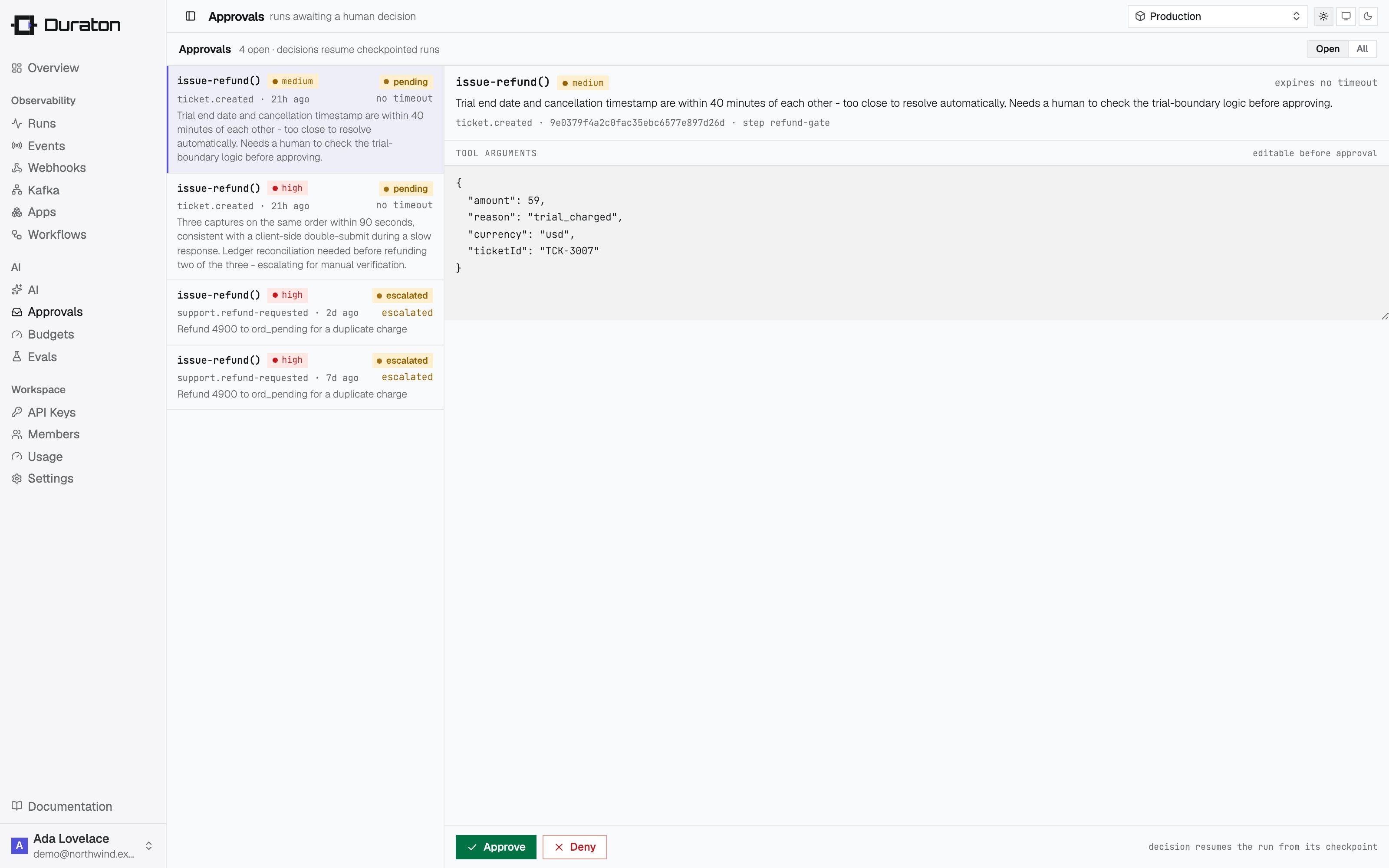
An open approval shows up in the Approvals inbox in the console: the proposed tool call, its risk, the run it belongs to, and an editable view of the arguments. Each of the four decisions resumes the parked run, and each is recorded in the control-action audit log. The console offers only the decisions the request allows. Approve becomes Approve with edits once you change the arguments, so the verb follows what you actually did rather than needing a second button. Reject and Respond each ask you to write the refusal first - a rejection with nothing in it leaves the agent to retry the identical call - and a response is required, since it stands in for the tool’s output. Withallow: ["approve", "reject"] the arguments stay locked and
no respond affordance appears at all.
A decided approval records how it was decided as well as by whom - decidedVia is console,
mcp, api, timeout, or unrecorded. It is always written by the engine and never settable by
the caller: from how the request authenticated, or from the clock when there was no request. The console shows it on the decision (“approved by alice@example.com via
console”), because a person clearing a gate from a signed-in session and an agent clearing it with a
write tool are not the same evidence. timeout is the case with no caller at all: the approval’s own
onTimeout resolved it, which reads as “approved by system:timeout via
timeout” and is deliberately not mistakable for a person. See the
approval object reference.
Every approvals action in the console is also an MCP tool, so an AI agent can work the same inbox -
a triage agent that clears routine requests and escalates the rest is a supported use, not a
workaround:
The request and decision payloads are in the approvals API reference; the tool
list is in the MCP reference.
Who may decide what
A gate exists to put a named someone between a proposed action and its execution. You can require that above a chosen risk level, that someone is a person: an approval at or above the floor is refused for any caller authenticating as a credential rather than as a signed-in human, and answers403.
The floor is a platform setting, one of low, medium or high. With a floor of high:
There is no floor unless you set one, and that default is deliberate. The floor is only useful
where a human has a decision surface to use it from: the Duraton console signs decisions as the
person who made them, so it sets
high. A bare engine with no signed decision surface would make a
high-risk gate undecidable by anyone. Set one once your operators have a way to sign a decision as
themselves.
The check runs when the decision is applied, so it holds identically over the API, over MCP, and over
any surface added later - narrowing one of them would leave the rest open. Reading is never
restricted: an agent can always list and inspect the inbox and tell its operator what is waiting.
The floor bounds the clock as well as callers: a gate at or above it cannot set
onTimeout: "approve", so a deadline never clears what an API key
would have been refused.
Set risk on the gate to place it (see The request above). An approval with no risk
is never above the floor - classify a call before relying on a gate to hold it.
Timeouts and escalation
timeout sets the deadline; onTimeout says what reaching it does. There is no default timeout:
an approval that sets none waits indefinitely, and resumes on a real decision however late it
arrives.
Omitting
onTimeout is escalate, which is what a deadline has always meant here: overdue is not
decided. Opt in to the other three per gate, where “nobody looked” has a right answer.
decidedBy: "system:timeout" and
decidedVia: "timeout" - see Deciding. Nobody decided, and the record says so rather
than leaving an unattributed decision behind.
What a deadline may not decide
Three configurations are refused, all of them cases where the clock would do something no reviewer was offered:
The engine checks all three when the approval is created, not when the deadline arrives: a
refused request fails the step immediately, so the author sees it in the run they are looking at
rather than hours later in a run nobody is watching.
escalate and fail decide nothing, so allow
does not constrain them.
Driving decisions from code
The same endpoints back the client, so a test - or a bot that auto-approves low-risk calls - can drive an approval end to end:refund-gate and receives the new arguments as decision.args; the
rejected run resumes with the reason as its tool result, so the agent can act on it. Both decisions
stay listable afterwards (duraton.approvals.list({ runId })) as the audit trail.
{ status: "approved" } and { status: "denied" } still decide an approval, and resolve to the
same verb the engine would derive - approved with edited args is an edit, without them an
approve, and denied is a reject. Naming the verb is clearer, and it is the only way to
respond.