Workspaces & projects
Keep teams and environments apart: a workspace holds members, roles, and one pooled allowance; a project is the isolation boundary for runs, events, and keys.
A workspace is your top-level grouping: its members, roles, and one pooled plan allowance. A project inside it is the isolation boundary - its own runs, events, API keys, runners, and webhooks, invisible to every other project.
An API key belongs to one project, so the key a runner or client carries is what puts it inside that project. The key and your Duraton URL are both shown on the project's page in the console:
import { createClient } from "@duraton/sdk/client";

const duraton = createClient({
  url: process.env.DURATON_URL!, // your Duraton base URL, shown in the console
  apiKey: process.env.DURATON_API_KEY!,       // a key issued in that project
});
import os
from duraton.client import AsyncDuratonClient
async with AsyncDuratonClient(
url=os.environ["DURATON_URL"], # your Duraton base URL, shown in the console
api_key=os.environ["DURATON_API_KEY"], # a key issued in that project
) as duraton:
...import (
"os"
"duraton.dev/sdk-go/client"
)
dx := client.New(client.Options{
URL: os.Getenv("DURATON_URL"), // your Duraton base URL, shown in the console
APIKey: os.Getenv("DURATON_API_KEY"), // a key issued in that project
})export DURATON_URL="https://run.duraton.dev"
export DURATON_API_KEY="dtn_live_..."There is no cross-project read: an event, run, workflow, or runner in one project cannot be listed, triggered, or resumed with another project's key.
Switching project
The console acts on one active project at a time. Switch it from the workspace menu; every view - runs, events, keys, usage - follows the switch.
Members and roles
Roles live at the workspace level, so a member has one role across it:
| Role | Can |
|---|---|
| Owner | Full control of the workspace, including other owners and deleting it. |
| Admin | Manage projects and members, and read + write across every project. |
| Member | Read across the workspace's projects; write is granted per project. |
A member's write access is scoped by a project list: leave it empty for workspace-wide write, or name projects to limit write to those.
Usage and limits
Duraton meters what your workspace runs and pools it across the workspace: usage is tallied per project, but every project draws from one shared plan allowance. Two things are counted:
- Steps - each durable step a run executes. This is the figure your plan is measured against.
- Events - each event ingested through
POST /events. Counted for context only; it never affects your allowance.
Concurrency - how many runs execute at the same time - is a plan capability rather than a monthly tally: it is a per-project ceiling, so each project runs up to the plan's concurrency limit on its own.
Only steps are enforced. When the workspace's pooled step count reaches the plan limit, Duraton stops starting new runs - and because usage pools, it pauses every project in the workspace at once, not just the project that ran the count up. Events and concurrency never trigger a suspension.
Free plan
| Metered | Free plan |
|---|---|
| Steps | 100,000 per calendar month (UTC), pooled across all projects |
| Concurrency | 10 simultaneous runs per project |
Steps reset at the start of each calendar month; a paused workspace resumes on its own once the new period begins (or once a higher plan raises the ceiling).
Reading your usage
The console's usage view shows the current period's steps and events, a per-project breakdown, and a chart over time, with the pooled total measured against your plan:
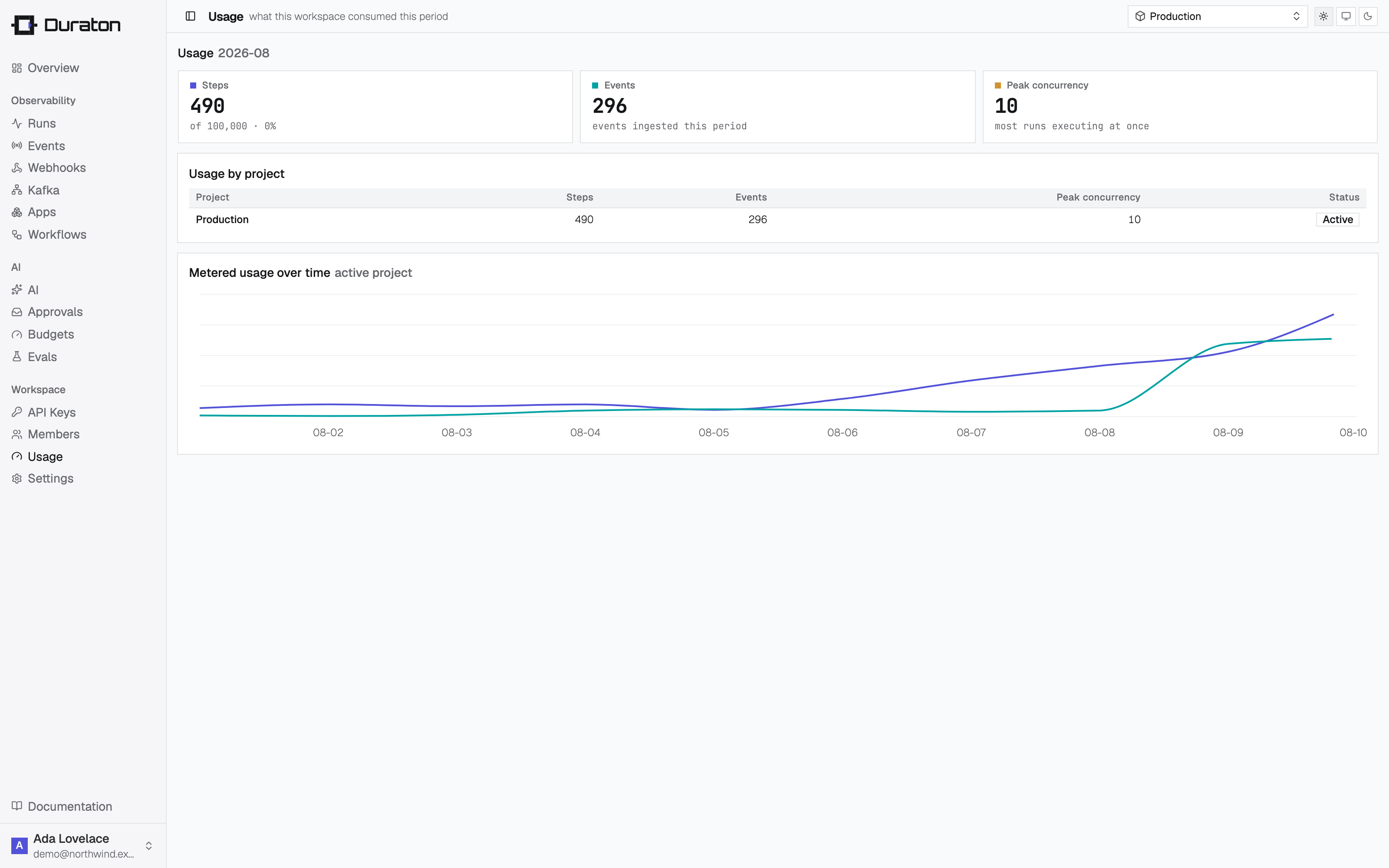
The console will warn you as a workspace approaches its step limit, ahead of any project being paused.
When the limit is reached
New runs are refused with 403 Forbidden until usage falls back under
the plan or the plan is raised. In-flight waiters still wake; only new runs are refused. A
triggered event is still accepted (202) and comes back with suspended: true and no
runId:
{ "woke": 0, "suspended": true }Runners (connect vs serve)
Run your workflow code wherever it already lives: dial out over a WebSocket with connect, or expose an inbound HTTP endpoint with serve.
Recipes
One complete, paste-and-run workflow per task - making a model call durable, parking a run on a human decision, retrying, waiting, scheduling, replaying, and webhooks.