Quickstart

Get your first durable run finishing in five steps: create a project, issue a key, write a workflow, connect a runner, and trigger it.

Five steps: create a project, issue a key, write a workflow, connect a runner, trigger it.

Duraton is in beta. Install from the @next tag: @duraton/sdk@next. A plain npm install @duraton/sdk resolves to the latest tag, which currently lags behind and is missing the recent features (run tags, bulkCancel, watchFiltered, step.skip, per-step retry, and more)

  • with no error to tell you. Use @next until latest catches up.

1. Create your project

Sign up at app.duraton.dev. A workspace is created for you with a first project inside it, and the Overview walks you through the steps below. A project is the isolated slice - its own runs, events, keys, and runners; a workspace holds many. You can add more projects - and invite members - later.

2. Issue an API key

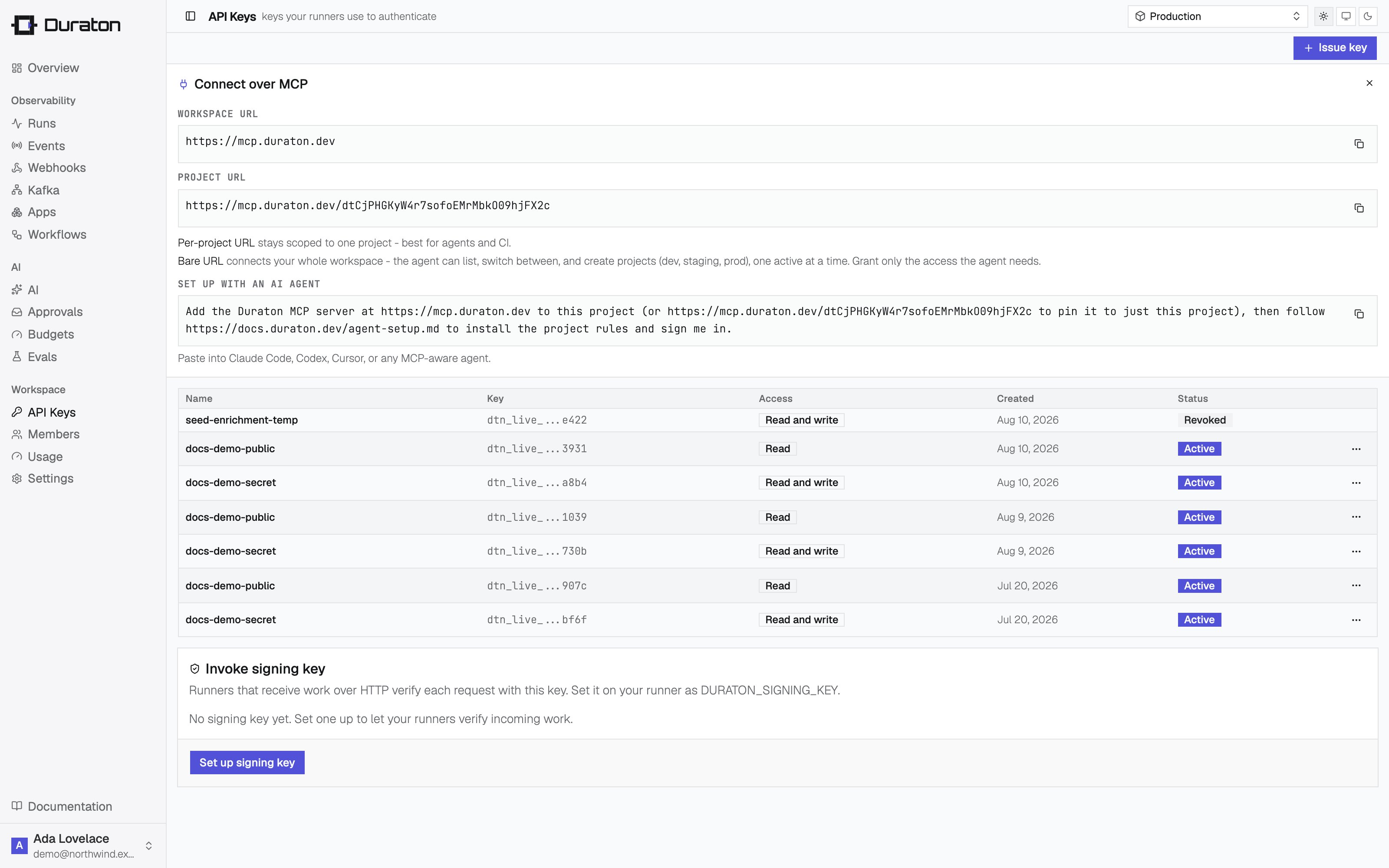
Keys are scoped to a project. In the console, open API Keys and issue a secret key. A secret key is read + write - your runner connects and reports results with it. It's shown once, so copy it now.

Issuing an API key in the console

Set it in your runner's environment, along with your Duraton base URL. Both are shown on the project's page in the console:

export DURATON_API_KEY="dtn_live_..."
export DURATON_URL="https://run.duraton.dev"

3. Write a workflow

Add the SDK for your language. The TypeScript SDK runs on Node.js and Bun:

npm install @duraton/sdk@next

A workflow is a function triggered by an event. Wrap each unit of work in a step so it runs once and its result is remembered.

runner.ts
import { defineWorkflow } from "@duraton/sdk";

interface TicketData {
  ticketId: string;
}

const ticketCreated = defineWorkflow<TicketData>({
  name: "ticket.created",
  retry: { maxAttempts: 3 },
  handler: async (ctx) => {
    const { ticketId } = ctx.event.data;

    const triage = await ctx.step.run("triage", () => ({
      category: "billing",
      priority: "high",
    }));

    await ctx.step.sleep("cool-off", "10s");

    const refund = await ctx.step.run("refund", () => ({
      refundId: `re_${ticketId}`,
    }));

    return { ticketId, triage, refund };
  },
});

4. Connect a runner

connect() dials Duraton over an outbound WebSocket. There is no port to expose, no public URL, and no separate registration - it works from a laptop, a container, or a box behind NAT. It reads DURATON_URL and DURATON_API_KEY from the environment you set in step 2.

runner.ts
import { connect } from "@duraton/sdk";

connect({ app: "support-app", workflows: [ticketCreated] });
npx tsx runner.ts

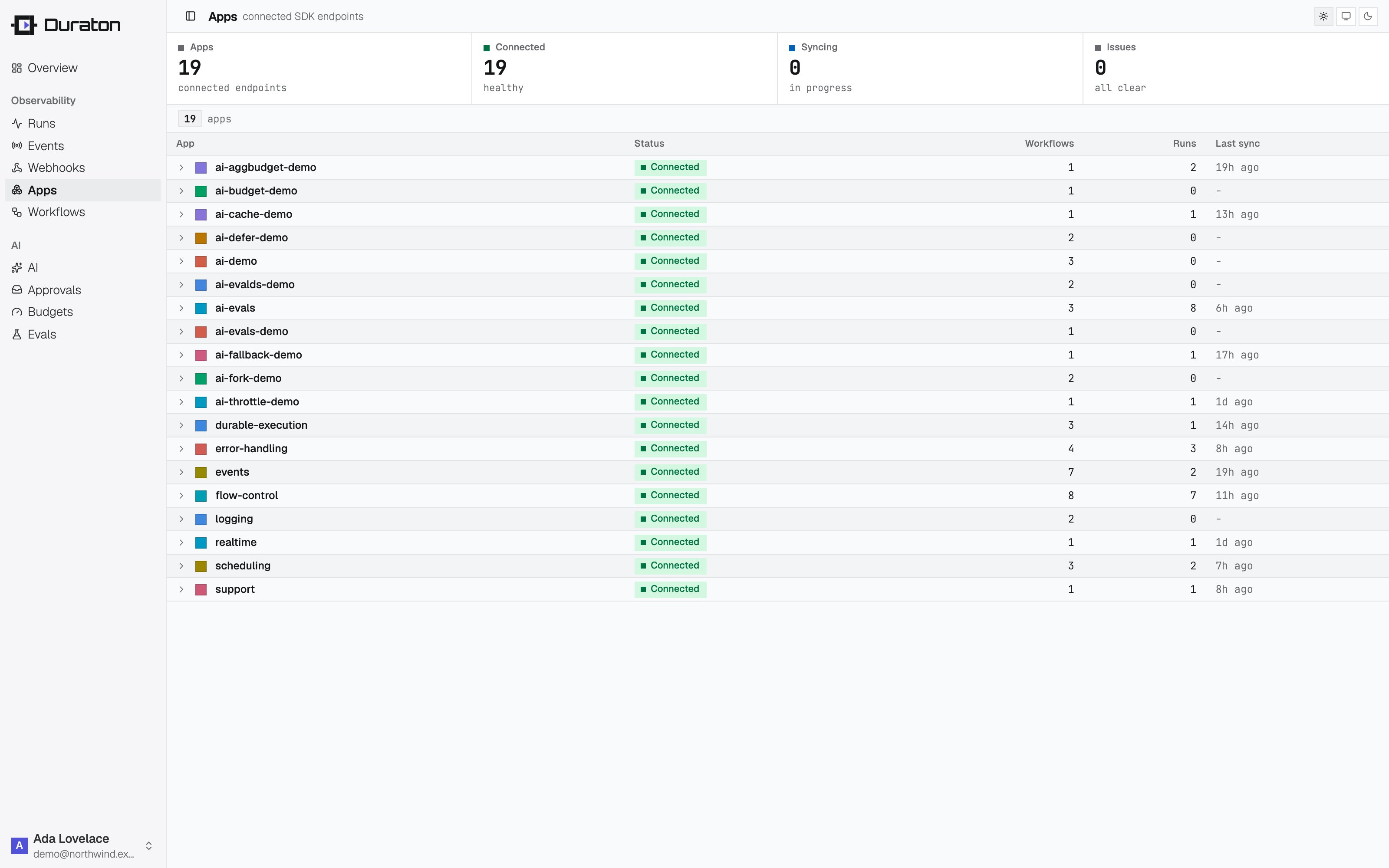
Open Apps in the console: the runner is listed as connected, with its workflows.

Connected apps and their runners in the console

Already hosting a public HTTP service?

If your workflows live in a service you already expose at a public address - a Next.js app, an Express API, a serverless function - mount them there with serve() instead. Duraton POSTs each invoke to runnerUrl, so that address must be reachable from the internet.

Each adapter both serves your workflows and registers them: passing app turns on registration, and the Duraton URL comes from DURATON_URL. The route defaults to /invoke.

A serve() runner must be reachable at its runnerUrl. If it is not - private network, laptop, NAT, or a dynamic address - use connect().

app/api/duraton/route.ts
import { serve } from "@duraton/sdk/next";
import { ticketCreated } from "../../../workflows";

export const { POST } = serve({
  app: "support-app",
  runnerUrl: "https://your-app.example.com/api/duraton",
  workflows: [ticketCreated],
});

Next.js and Bun need only the SDK. The others also need their framework installed - add hono, elysia, express, or fastify with your package manager.

5. Trigger it

Send the event the workflow listens for - with the SDK client, or over the REST API authenticated with your key:

import { createClient } from "@duraton/sdk";

const duraton = createClient({
  url: process.env.DURATON_URL!,
  apiKey: process.env.DURATON_API_KEY,
});

await duraton.events.send({
  name: "ticket.created",
  app: "support-app",
  data: { ticketId: "T-421" },
});

Open Runs in the console. triage completes, the run waits out the sleep, then refund completes and the run succeeds - streaming in live as it executes.
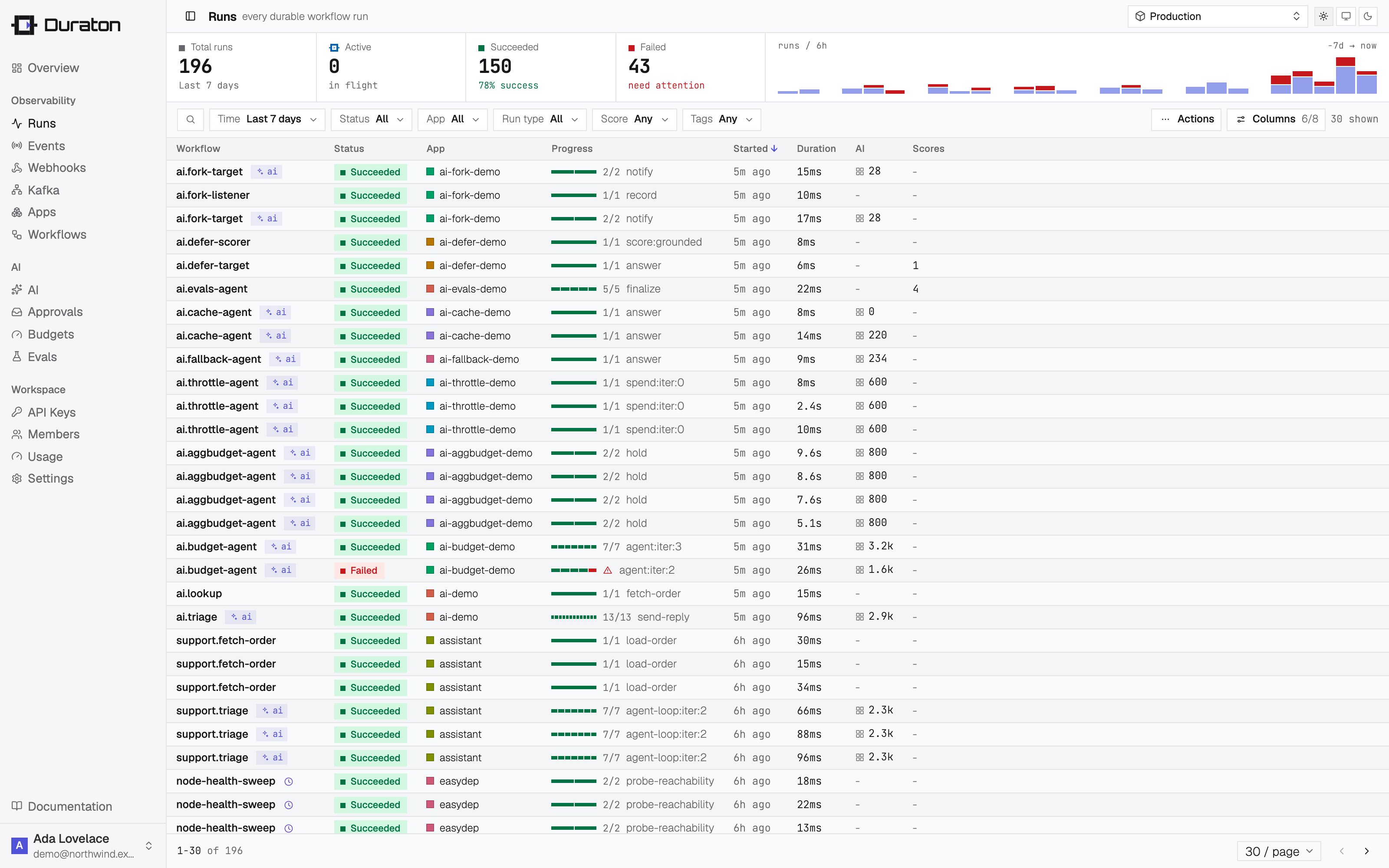
Runs in the console

6. Restart the runner mid-run

While the run is sleeping, stop your runner (Ctrl-C) and start it again the same way you ran it above. Duraton holds the run and re-invokes when the runner reconnects. triage does not run a second time - its result was recorded on the first pass, so the run resumes at refund.

Next steps

On this page