Workflows
Define a workflow, group it into an app, and trigger it with an event.
A workflow is a durable function started by an event or a schedule. You define it with
defineWorkflow, then connect a runner so Duraton can drive it.
import { defineWorkflow } from "@duraton/sdk";

interface TicketData {
  ticketId: string;
}

const ticketCreated = defineWorkflow<TicketData>({
  name: "ticket.created",
  retry: { maxAttempts: 3 },
  handler: async (ctx) => {
    return await ctx.step.run("triage", () => triageTicket(ctx.event.data));
  },
});
from duraton import RetryConfig, define_workflow
from duraton.context import StepContext
async def handle_ticket(ctx: StepContext) -> object:
return await ctx.step.run("triage", lambda: triage_ticket(ctx.event.data))
ticket_created = define_workflow(
"ticket.created",
handle_ticket,
retry=RetryConfig(max_attempts=3),
)type Ticket struct {
ID string `json:"ticketId"`
}
var ticketCreated = duraton.DefineWorkflow(duraton.WorkflowDefinition{
Name: "ticket.created",
Retry: &duraton.RetryConfig{MaxAttempts: 3},
Handler: func(c *duraton.Context) (any, error) {
ticket, err := duraton.EventData[Ticket](c)
if err != nil {
return nil, err
}
return duraton.Run(c, "triage", func() (any, error) {
return triageTicket(ticket)
})
},
})| Property | Type | Default | Description |
|---|---|---|---|
name | string | required | Identifies the workflow. With no triggers, an event of the same name starts it. |
handler | (ctx) => Promise<T> | required | The workflow body. It receives the handler context and does durable work through ctx.step. See Steps. |
triggers | Trigger[] | the workflow's own name | What starts the workflow: event triggers (with filters and wildcards) or cron schedules. See Triggers. |
retry | { maxAttempts } | { maxAttempts: 1 } | How a failing step retries. See Retries. |
onFailure | (ctx) => Promise<void> | none | Compensation or notification that runs once the run has failed. See Retries. |
The type parameter (<TicketData>) types ctx.event.data, so your event payload is checked. The full
handler context - ctx.event, ctx.step, ctx.log, ctx.runId, ctx.attempt, and the rest - is
documented in SDK: Steps. defineWorkflow also takes flow-control options
(concurrency, throttle, rateLimit, debounce, batch, priority, singleton, idempotency)
and AI spend options (cap, budget, tokenThrottle); see
Defining workflows.
Apps and runners
An app is a named set of workflows that run together in one process. A runner is a process
serving one app. connect() dials Duraton over an outbound WebSocket, registers the app's workflows,
and receives invokes on that socket - so the runner needs no inbound URL and no separate registration
call.
import { connect } from "@duraton/sdk";

const handle = connect({
  url: process.env.DURATON_URL, // your Duraton base URL, shown in the console
  apiKey: process.env.DURATON_API_KEY,
  app: "support-app",
  workflows: [ticketCreated],
});

process.on("SIGTERM", () => handle.close());
import asyncio
from duraton import Runner
async def main() -> None:
# url / app / api_key fall back to DURATON_URL / DURATON_APP / DURATON_API_KEY.
await Runner([ticket_created], app="support-app").run()
asyncio.run(main())runner, err := duraton.Connect(duraton.ConnectOptions{
App: "support-app",
Workflows: []duraton.WorkflowDefinition{ticketCreated},
// URL / App / APIKey fall back to DURATON_URL / DURATON_APP / DURATON_API_KEY.
})
if err != nil {
log.Fatal(err)
}
defer runner.Close()
runner.Wait()Re-connecting re-registers the app's workflows, so restarts and deploys are safe. If your runner is
already a publicly reachable HTTP service, serve() is the alternative transport.
Triggering a run
Send an event whose name matches a workflow. Duraton creates a run and drives it to completion.
import { createClient } from "@duraton/sdk";

const duraton = createClient({ url: process.env.DURATON_URL });

await duraton.events.send({
  name: "ticket.created",
  app: "support-app",
  data: { ticketId: "T-421" },
});
from duraton.client import AsyncDuratonClient, SendEventInput
async with AsyncDuratonClient() as dx:
res = await dx.events.send(
SendEventInput(name="ticket.created", app="support-app", data={"ticketId": "T-421"})
)
res.run_idimport (
"context"
"encoding/json"
"duraton.dev/sdk-go/client"
)
dx := client.New(client.Options{})
res, err := dx.Events.Send(context.Background(), client.SendEventInput{
Name: "ticket.created",
App: "support-app",
Data: json.RawMessage(`{"ticketId":"T-421"}`),
})
res.RunIDcurl -X POST $DURATON_URL/events \
-H "Authorization: Bearer $DURATON_API_KEY" \
-H "Content-Type: application/json" \
-d '{"name":"ticket.created","app":"support-app","data":{"ticketId":"T-421"}}'The response carries the run id. Inspect the run with GET /runs/{id} and its steps
with GET /runs/{id}/steps.
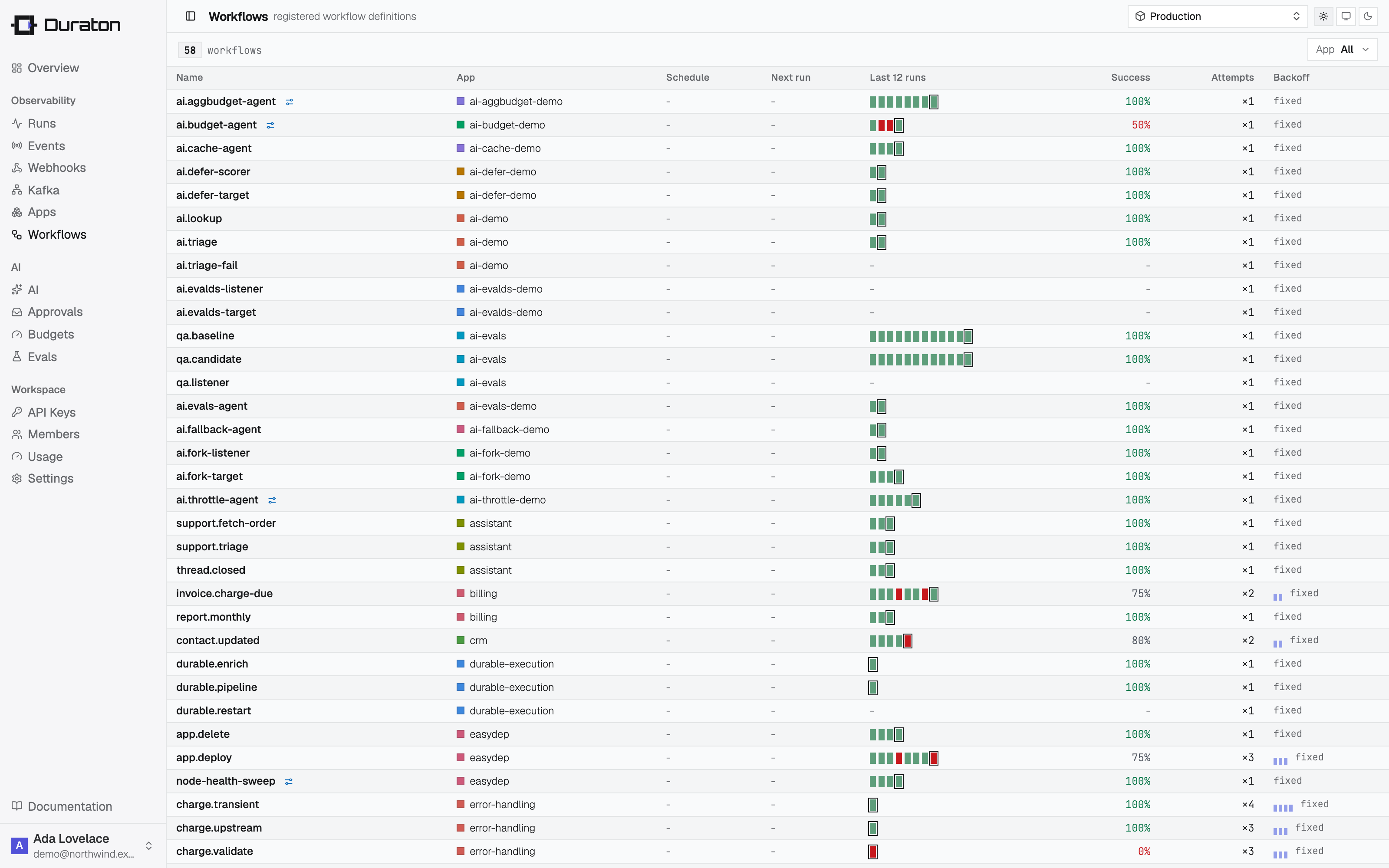
The console lists every workflow an app has registered; select one to open its detail drawer, with the definition, live stats, charts, and that workflow's runs.
Durable execution
Why a long agent picks up where it stopped instead of starting over: each step's result is recorded the moment it completes, and replay skips it.
Triggers
Start a run from exactly the right thing: event triggers with CEL filters and wildcards, cron schedules, or a manual trigger with no event at all.