Evals
Tell whether a prompt change made the agent better: score a run inline, grade it after it finishes, fork it with one change, or fan a dataset through it.
An eval answers one question: did this change make the output better? Duraton answers it with scores - named results attached to a run - and three ways to produce them: inline as the workflow runs, deferred by a grader workflow after it finishes, or in bulk by re-running a dataset.
await ctx.score({ name: "helpfulness", value: 0.9, comment: "clear and correct" });await ctx.score(ScoreInput(name="helpfulness", value=0.9, comment="clear and correct"))v := 0.9
duraton.Score(c, duraton.ScoreInput{Name: "helpfulness", Value: &v, Comment: "clear and correct"})| Mechanism | Grades | Use it when |
|---|---|---|
ctx.score | the current run | The workflow can judge its own output as it goes. |
ctx.assert.* | the current run | The check is deterministic: output match, a step ran, steps ran in order. |
| Deferred scorers | any finished run | The grader is separate from the graded workflow (an LLM judge, a human review). |
| Fork-compare | one run vs its fork | You want to try one model or prompt change against a real run. |
| Dataset evals | a whole run-set | You want a number over many cases, not one. |
The full option and response tables are in the evals SDK reference and the evals API reference.
Score inline
ctx.score records a named score on the current run. It is durable and memoized - a replay after a
crash never records it twice - and the score name is its identity, so you pass no step id.
export const draftReply = defineWorkflow<{ ticket: string }>({
  name: "draft-reply",
  handler: async (ctx) => {
    const reply = await ctx.step.ai.generate("draft", {
      model: "claude-opus-4-8",
      prompt: `Reply to: ${ctx.event.data.ticket}`,
    });

    await ctx.score({ name: "length-ok", value: reply.text.length <= 500 ? 1 : 0, dataType: "boolean" });
    await ctx.score({ name: "tone", stringValue: "friendly", dataType: "categorical" });

    return reply.text;
  },
});
from duraton import GenerateOptions, ScoreInput, define_workflow
from duraton.context import StepContext
async def draft(ctx: StepContext) -> object:
reply = await ctx.step.ai.generate("draft", GenerateOptions(
model="claude-opus-4-8",
prompt=f"Reply to: {ctx.event.data['ticket']}",
))
await ctx.score(ScoreInput(name="length-ok", value=1 if len(reply.text) <= 500 else 0, data_type="boolean"))
await ctx.score(ScoreInput(name="tone", string_value="friendly", data_type="categorical"))
return reply.text
draft_reply = define_workflow("draft-reply", draft)type Ticket struct {
Ticket string `json:"ticket"`
}
var draftReply = duraton.DefineWorkflow(duraton.WorkflowDefinition{
Name: "draft-reply",
Handler: func(c *duraton.Context) (any, error) {
ticket, err := duraton.EventData[Ticket](c)
if err != nil {
return nil, err
}
reply, err := duraton.Generate(c, "draft", duraton.GenerateOptions{
Model: "claude-opus-4-8",
Prompt: "Reply to: " + ticket.Ticket,
})
if err != nil {
return nil, err
}
lengthOK := 0.0
if len(reply.Text) <= 500 {
lengthOK = 1
}
if err := duraton.Score(c, duraton.ScoreInput{Name: "length-ok", Value: &lengthOK, DataType: duraton.ScoreBoolean}); err != nil {
return nil, err
}
if err := duraton.Score(c, duraton.ScoreInput{Name: "tone", StringValue: "friendly", DataType: duraton.ScoreCategorical}); err != nil {
return nil, err
}
return reply.Text, nil
},
})A score is numeric (a number in value), boolean (value is 0 or 1), or categorical (a label in
stringValue). Read them back with duraton.runs.scores(runId), or filter the runs list to a named
score in a value range: duraton.runs.list({ scoreName: "length-ok", minScore: 1 }).
Assert deterministically
ctx.assert.* are deterministic checks that each record a boolean score (source: "code") and return
whether they passed. They read the run's own step record, so they need no model.
await ctx.assert.usedStep("retrieve");            // scores boolean "used:retrieve"
await ctx.assert.sequence(["retrieve", "answer"]); // scores boolean "sequence"
await ctx.assert.equals(answer.text, { expected: "Paris" }); // scores boolean "match"
await ctx.asserts.used_step("retrieve") # scores boolean "used:retrieve"
await ctx.asserts.sequence(["retrieve", "answer"]) # scores boolean "sequence"
await ctx.asserts.equals(answer.text, expected="Paris") # scores boolean "match"| Assertion | Records | Checks |
|---|---|---|
usedStep(step) | used:<step> | That a step with that id ran - tool choice: did the agent take that path. |
sequence(steps) | sequence | That the named steps ran in that relative order. |
equals(actual, opts?) | match | That actual deep-equals opts.expected, defaulting to the eval item's expected output (see dataset evals). |
Each takes { name?, comment? } to override the score name or annotate it.
Grade a finished run
A deferred scorer grades a run after it finishes, with no code in the graded workflow. When any
run reaches a terminal state, Duraton emits the reserved system event duraton/run.finished. A
workflow subscribed to it is an ordinary run that scores the finished run by passing its runId to
ctx.score.
import { defineWorkflow, RUN_FINISHED_EVENT, type RunFinishedEvent } from "@duraton/sdk";

export const gradeHelpfulness = defineWorkflow<RunFinishedEvent>({
  name: "grade-helpfulness",
  triggers: [{ event: RUN_FINISHED_EVENT, if: "event.data.workflow == 'draft-reply'" }],
  handler: async (ctx) => {
    const finished = ctx.event.data;

    const judgment = await ctx.step.ai.generate<{ score: number }>("judge", {
      model: "claude-opus-4-8",
      prompt: `Rate the helpfulness 0..1 of: ${JSON.stringify(finished.output)}`,
      output: { type: "object", properties: { score: { type: "number" } }, required: ["score"] },
    });

    await ctx.score({
      runId: finished.runId,          // the FINISHED run, not this one
      name: "helpfulness",
      value: judgment.output?.score ?? 0,
      source: "llm-judge",
    });
  },
});
A scorer must filter which runs it grades. The if above is what keeps the loop from feeding
itself: an unfiltered scorer would grade every finished run, including its own.
The duraton/run.finished payload carries the finished run's runId, workflow, app, status,
and its output (or error). To grade by hand instead - a human review - post the score directly:
duraton.runs.score(runId, { name: "human-review", value: 1, source: "human" }).
Fork-compare
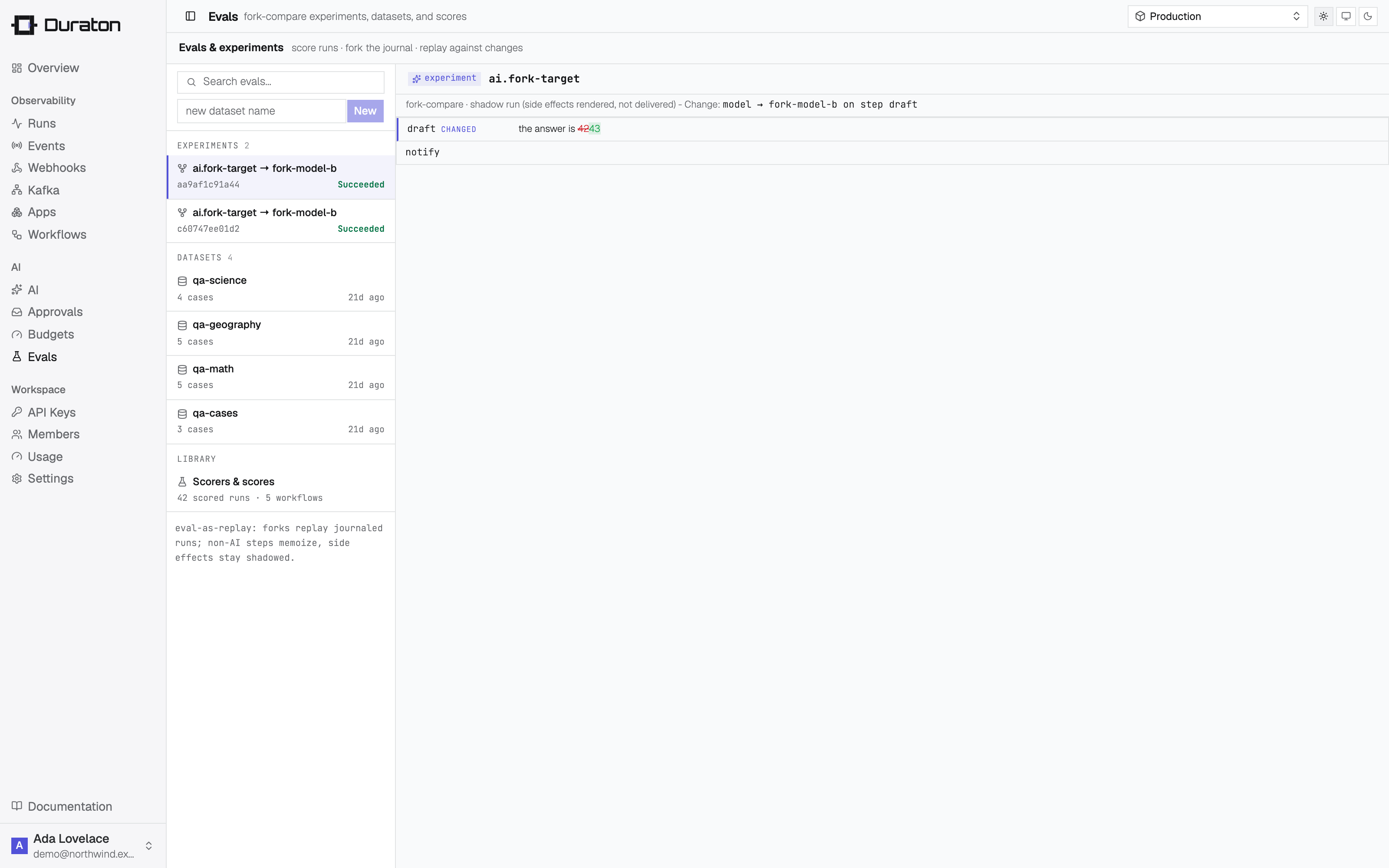
A fork re-runs a finished run with one declared change on a single AI step - a different model, prompt, or params - so you can compare the outcome against the original. Duraton replays the steps before the changed step from their recorded results and resumes execution at the change.
const fork = await duraton.runs.fork(baseRunId, {
  step: "draft",              // the AI step to change; execution resumes here
  model: "claude-haiku-4-5",  // ...try a cheaper model
  // prompt: "Be more concise.",
  // params: { temperature: 0.2 },
});

const [base, candidate] = await Promise.all([
  duraton.runs.scores(baseRunId),
  duraton.runs.scores(fork.id),
]);
from duraton.client import ForkInput
fork = await dx.runs.fork(base_run_id, ForkInput(
step="draft", # the AI step to change; execution resumes here
model="claude-haiku-4-5", # ...try a cheaper model
# prompt="Be more concise.",
# params={"temperature": 0.2},
))
base = await dx.runs.scores(base_run_id)
candidate = await dx.runs.scores(fork.id)fork, _ := dx.Runs.Fork(ctx, baseRunID, client.ForkInput{
Step: "draft", // the AI step to change; execution resumes here
Model: "claude-haiku-4-5", // ...try a cheaper model
})
base, _ := dx.Runs.Scores(ctx, baseRunID)
candidate, _ := dx.Runs.Scores(ctx, fork.ID)The fork is a run like any other, linked back to the base by replayOf and carrying its change in
fork. It is a shadow run: its side effects render but do not deliver, so ctx.webhook.send,
ctx.step.emit, and ctx.step.runWorkflow appear as steps without firing. The console's compare view
renders the same diff, with a verdict strip of the base-vs-fork score deltas.
Shadowing covers Duraton's own side effects only. Arbitrary I/O inside a step.run body - a direct
database write, say - is invisible to Duraton and is not shadowed. Fork the workflows whose
outward effects go through Duraton.
Dataset evals
A dataset is a named collection of test cases, each an input to run the workflow against and an
optional expected output to grade it on. Fanning a dataset through a workflow creates an eval
run-set: one shadow run per item, graded and aggregated together.
const ds = await duraton.datasets.create("qa-cases");
await duraton.datasets.addItem(ds.id, { input: { q: "capital of france" }, expected: "Paris" });
await duraton.datasets.addItem(ds.id, { input: { q: "2+2" }, expected: "4" });

const { evalSet, runIds } = await duraton.datasets.runEval(ds.id, {
  workflow: "qa.answer",
  label: "baseline",
});
from duraton.client import DatasetItemInput, RunEvalInput
ds = await dx.datasets.create("qa-cases")
await dx.datasets.add_item(ds.id, DatasetItemInput(input={"q": "capital of france"}, expected="Paris"))
await dx.datasets.add_item(ds.id, DatasetItemInput(input={"q": "2+2"}, expected="4"))
result = await dx.datasets.run_eval(ds.id, RunEvalInput(workflow="qa.answer", label="baseline"))Inside the handler, an eval run knows what it is: ctx.eval is set only on an eval run and carries
the item's expected output, so the workflow can grade itself against it.
export const qaAnswer = defineWorkflow<{ q: string }>({
  name: "qa.answer",
  handler: async (ctx) => {
    const answer = await ctx.step.ai.generate("answer", {
      model: "claude-opus-4-8",
      prompt: `Question: ${ctx.event.data.q}`,
    });

    if (ctx.eval) {
      await ctx.assert.equals(answer.text); // grades against ctx.eval.expected
      await ctx.assert.usedStep("answer");
    }

    return answer.text;
  },
});
Read the run-set's aggregate to compare a candidate against the baseline:
const sets = await duraton.datasets.evalRuns(ds.id);
// each set: { label, runCount, scores: [{ name, avg, count }] }
sets = await dx.datasets.eval_runs(ds.id)
# each set: { label, run_count, scores: [{ name, avg, count }] }Change the model or the prompt, run the dataset again with label: "candidate", and the two sets'
per-name averages are the comparison. The console's datasets view lists a dataset's eval sets with
those averages and compares the two newest.
One fan-out evaluates at most 200 items (the oldest non-archived items up to that many). An
item's expected rides ctx.eval.expected and never the run input, so grading a workflow never
puts the answer in its own prompt.
Over MCP
An agent is a first-class user of all of this: score_run and list_scores record and read scores,
fork_compare runs the A/B, and create_dataset + add_dataset_item + run_eval +
list_eval_runs author a dataset, fan it through a workflow, and read the verdict. See the
MCP reference.