> ## Documentation Index
> Fetch the complete documentation index at: https://docs.duraton.ai/llms.txt
> Use this file to discover all available pages before exploring further.
# Runs API
> Find any run and see what it did: list, filter, paginate, and summarize runs, and read one run's steps, logs, and AI spend.
The read-only runs API backs the console's Runs views. Mutating actions
(cancel, pause, resume, replay) live in the [control API](/reference/api/control).
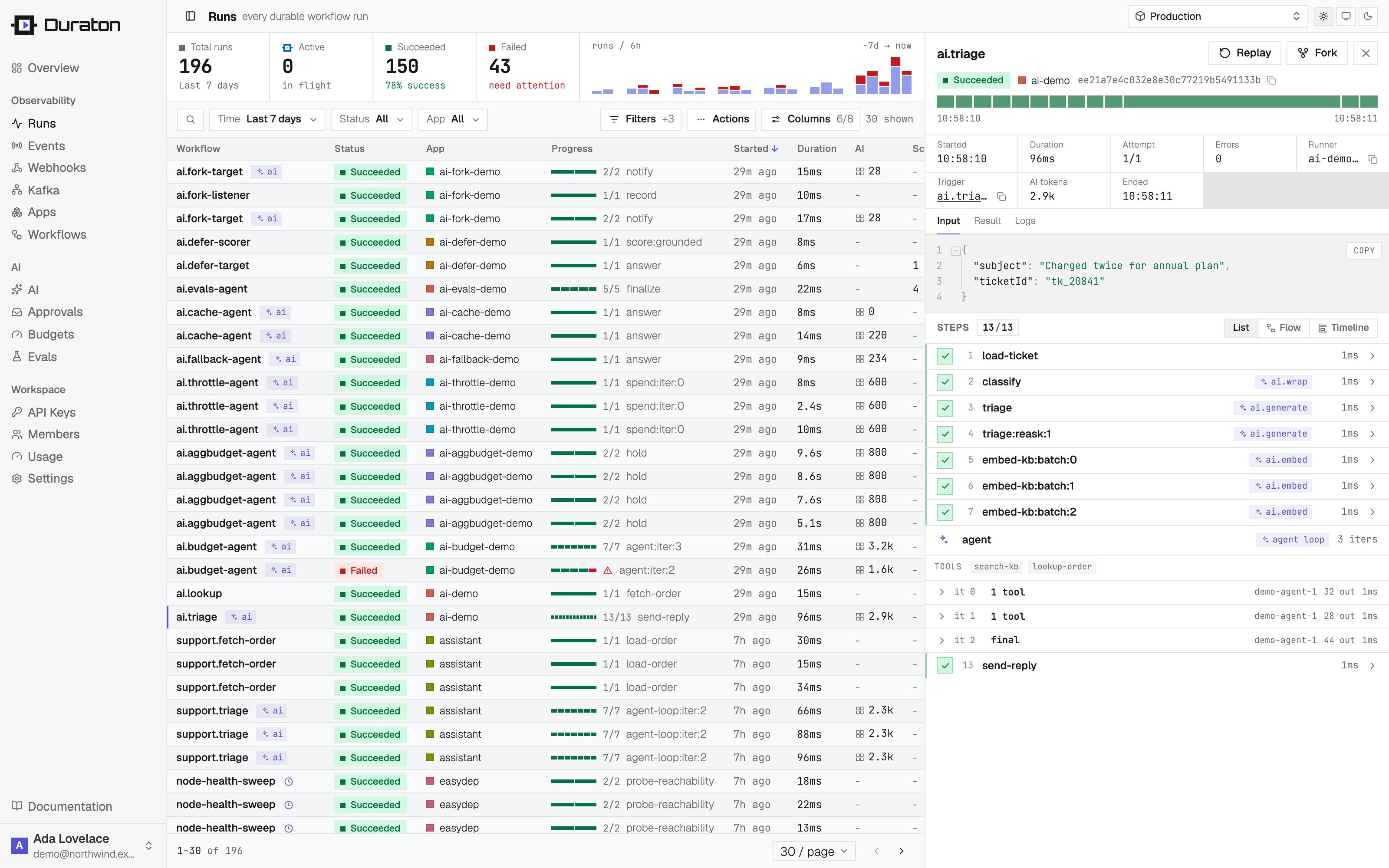 | Method + path | Returns |
| ----------------------- | --------------------------------------------------------------------------------- |
| `GET /runs` | A page of run summaries, newest first, plus an `X-Next-Cursor` header. |
| `GET /runs/{id}` | One run, including its `input` and `result`. |
| `GET /runs/{id}/steps` | The run's steps, in order. |
| `GET /runs/{id}/logs` | The run's captured `ctx.log` lines, in order. |
| `GET /runs/{id}/stream` | A live SSE stream of the run's timeline (status + logs). |
| `GET /runs/stream` | A live SSE stream of run status transitions across the project. |
| `GET /runs/stats` | Aggregate counts plus p50/p95 latency for the current filter. |
| `GET /runs/timeseries` | Run counts bucketed over time, with per-bucket duration averages and percentiles. |
| `GET /ai/spend` | AI token/cost rollup - totals plus by-hour, by-model, by-workflow. |
| `GET /sessions` | Conversation sessions: runs grouped by session id, with per-session rollups. |
## Listing & filtering
`GET /runs` accepts these query parameters:
| Param | Meaning | Default |
| ------------- | ------------------------------------------------------------------------------------------------------------------------------------------------------------------------------------------------------------------------------------------------------------------------------------------------------------------------------------------------------------------------------------------------------------------------------ | --------------------- |
| `app` | Restrict to one app. | all apps |
| `workflow` | Restrict to one workflow name. | all workflows |
| `status` | One run status: `queued`, `running`, `waiting`, `paused`, `needs_attention`, `succeeded`, `failed`, `cancelled` - each matches exactly (`running` is a run actively executing a step; `waiting` is a run parked on a retry backoff, sleep, event, or child). Two aliases group them: `active` selects the in-flight set (`queued` + `running` + `waiting`), and `all` means no status filter, identical to omitting the param. | all |
| `runType` | One [trigger kind](/core/triggers#trigger-kinds): `event`, `cron`, or `manual`. | all |
| `eventId` | Restrict to the runs one event fanned out (event->run lineage). | all |
| `replayOf` | Restrict to the runs forked from one source run by replay / retry-from-step (replay->run lineage). | all |
| `parentRunId` | Restrict to the direct children of one run - the runs its `step.runWorkflow` calls spawned (call->run lineage). One nesting level, never grandchildren. | all |
| `session` | Restrict to one conversation session id (the `session` sent on the event). | all |
| `tag.` | Restrict to runs carrying that [tag](#run-tags) with the given value, e.g. `tag.customerId=abc`. Repeatable across keys; multiple tag filters are ANDed. Index-backed. | all |
| `q` | Substring match on workflow name, run id, or app. | none |
| `deep` | `1` to widen `q` to also match run input, result, and error content (a case-insensitive substring scan); ignored without `q`. | off |
| `since` | RFC3339 timestamp; only runs started at or after it. | no lower bound |
| `sort` | `started`, `workflow`, `status`, `app`, or `duration`. | `started` |
| `dir` | `asc` or `desc`. | `desc` (newest first) |
| `limit` | Page size, `1`-`200`. | `30` |
| `cursor` | Opaque keyset cursor from a previous page (see below). | none |
`deep=1` widens the scan from indexed run metadata to the run's stored JSON, so bound it: the payload
scan runs inside whatever other filters you apply (`since`, `status`, `app`), and on a busy project a
narrow time window is the difference between an index lookup and a full scan.
```ts theme={null}
import { createClient } from "@duraton/sdk/client";
const duraton = createClient({ url: process.env.DURATON_URL! });
const page = await duraton.runs.list({ app: "demo", status: "failed", sort: "duration", dir: "desc", limit: 20 });
page.runs; // Run[]
page.nextCursor; // pass back as { cursor } for the next page
```
```sh theme={null}
curl "$DURATON_URL/runs?app=demo&status=failed&sort=duration&dir=desc&limit=20"
```
Each run carries `triggerKind` - one of `event`, `cron`, or `manual` (see [trigger
kinds](/core/triggers#trigger-kinds)) - so a scheduled or manually-started run is
distinguishable both in the list and on the run object.
An event-triggered run also carries `eventName` and `eventId` - the event that fanned it out
(event->run lineage). `eventId` matches the event log's `id`, so `GET /runs?eventId=` returns
every run one event produced, and a run links back to its exact event. Cron, child
(`step.runWorkflow`), and on-failure runs have no `eventId`.
A run created by [replay or retry-from-step](/reference/api/control) carries `replayOf` - the id of the
source run it was forked from (replay->run lineage). `GET /runs?replayOf=` returns every run
forked from one source, and the new run links back to its origin. Original runs have no `replayOf`.
A run spawned by a `step.runWorkflow` call - a [workflow-backed agent
tool](/agent-kit/agents-and-tools) included - carries the call edge it was spawned on (call->run
lineage): `parentRunId` (the run that spawned it), `parentStep` (the step it was spawned on) and
`parentAttempt` (which attempt of that step spawned it). The spawning step carries `childRunId` back,
so the edge is followable both ways. `GET /runs?parentRunId=` returns every child one run
started - exact equality on one nesting level, so direct children only, never grandchildren.
Top-level runs carry none of the three, and neither does a run triggered by an event another run
emitted: only a `runWorkflow` call sets this edge.
Every run also carries `depth`, its **causal** nesting, absent (`0`) at the top. A `runWorkflow` child
is its parent's depth + 1, and an [emit-triggered run](/core/triggers) is the emitting run's + 1 - so
a run can sit at `depth > 0` with no `parentRunId` at all.
## Run tags
Tags are customer-defined key/value metadata you attach to a run so you can slice runs by your own
dimensions - `customerId`, `region`, `plan`, `batchId`, whatever you name. Every run carries its tags
as a `tags` object on the run, and `GET /runs?tag.=` filters by them, index-backed (no
full scan). The same filter applies to [`GET /runs/stats`](#run-stats).
**Set tags in two places:**
* On an event (`events.send` / `POST /events`): the event's tags attach to **every run it triggers** -
natural for "tag all runs from this webhook / customer".
* On a child run (`step.runWorkflow`): the tags apply to that child run.
**Inheritance.** A `step.runWorkflow` child inherits its parent run's tags and merges its own on top,
with the child's value winning on a shared key. So a `tag.customerId=X` set on the top-level event
also matches the child runs that run spawned - "show all work for customer X" spans the whole tree.
**Limits.** At most 20 tags per run; each key up to 64 characters matching `[A-Za-z0-9_.-]`; each value
up to 256 characters. An over-limit or malformed tag is rejected with a `400` (it is never silently
truncated).
```ts theme={null}
import { createClient } from "@duraton/sdk/client";
const duraton = createClient({ url: process.env.DURATON_URL! });
// Tag every run this event triggers.
await duraton.events.send({
name: "ticket.created",
app: "support-app",
data: { ticketId: "T-421" },
tags: { customerId: "cus_42", region: "eu" },
});
// Filter runs by tag (AND across keys).
const page = await duraton.runs.list({ tags: { customerId: "cus_42", region: "eu" } });
```
Inside a workflow, tag a child run - it also inherits the parent's tags:
```ts theme={null}
await ctx.step.runWorkflow("enrich", {
name: "ticket.enrich",
data: { ticketId: "T-421" },
tags: { stage: "enrich" }, // + inherited customerId/region from the parent
});
```
```sh theme={null}
# tag every run this event triggers
curl -X POST $DURATON_URL/events \
-d '{"name":"ticket.created","app":"support-app","data":{"ticketId":"T-421"},"tags":{"customerId":"cus_42","region":"eu"}}'
# filter runs by tag (repeatable, ANDed)
curl "$DURATON_URL/runs?tag.customerId=cus_42&tag.region=eu"
```
Sending `tags` on an event and the `tag.` runs filter are both supported in the TypeScript SDK.
The wire contract (`tags` on an event, `tag.` on the runs filter) is stable, so any language can
use tags over REST.
## Look up a single run
When you know a run by a **business key** rather than its Duraton run id - "the run for `ticketId=123`" -
tag it at trigger time and look it up by that tag. This is just the list query with `limit=1`: the
filters (`tag.`, `app`, `workflow`, `status`, `session`) narrow the set, and `sort`/`dir` decide
**which** run you get when several match. There is no separate lookup endpoint - `GET /runs` already does
it - and no "ambiguous match" error: the newest match wins by default, and you pick a different one by
changing `sort`/`dir`.
The TypeScript SDK wraps this as `runs.find(opts)`, which returns the one matching run or `null`:
```ts theme={null}
import { createClient } from "@duraton/sdk/client";
const duraton = createClient({ url: process.env.DURATON_URL! });
// The most recent run tagged ticketId=123 (or null if there is none).
const run = await duraton.runs.find({ tags: { ticketId: "123" } });
// Narrow further, and pick the oldest match instead of the newest.
const first = await duraton.runs.find({
tags: { ticketId: "123" },
app: "support-app",
status: "failed",
dir: "asc",
});
```
```sh theme={null}
# newest run tagged ticketId=123; the body is an array (empty if no match)
curl "$DURATON_URL/runs?tag.ticketId=123&limit=1"
```
**For AI agents:** the same lookup is an MCP tool, `find_run` - call it with `tags` (plus optional
`app`/`workflow`/`status` and `sort`/`dir`) to get one run back as `{ found, run }`. It sits beside
`get_run` (by id) and `list_runs` (the full page) in the engine MCP tool list, so an agent can discover
and use it without knowing a run id.
## Keyset pagination
Paging is **cursor-based (keyset)**, not offset-based. Each response carries up to `limit` run
summaries plus an `X-Next-Cursor` header when more rows exist; pass that value back as `?cursor=` to
fetch the next (older) page:
```sh theme={null}
# first page - read the X-Next-Cursor response header
curl -sD - "$DURATON_URL/runs?limit=2" -o /dev/null | grep -i x-next-cursor
# next page
curl "$DURATON_URL/runs?limit=2&cursor="
```
The cursor encodes the current sort position, so paging stays correct while new runs arrive - no rows
are skipped or repeated the way offset paging drifts under concurrent inserts. The header is **absent on
the last page**. A cursor is tied to the `sort`/`dir` it was issued for; changing either invalidates it,
so start a fresh page when the ordering changes.
## Run steps
`GET /runs/{id}/steps` returns the run's [steps](/core/steps), ordered by execution
position and then attempt. It takes no `limit` - every recorded step row for the run is returned. This
is the read model behind a progress view and the run-detail step list.
```json theme={null}
[
{
"name": "validate", "index": 0, "attempt": 1, "status": "succeeded",
"input": { "ticketId": "T-421" }, "output": { "ok": true },
"startedAt": "2026-06-22T10:00:00Z", "endedAt": "2026-06-22T10:00:00Z", "durationMs": 12
},
{
"name": "triage", "index": 1, "attempt": 1, "status": "failed",
"error": { "message": "gateway timeout" },
"willRetry": true, "runAfter": "2026-06-22T10:00:05Z", "nextAttemptAt": "2026-06-22T10:00:05Z",
"startedAt": "2026-06-22T10:00:00Z", "endedAt": "2026-06-22T10:00:00Z", "durationMs": 30000
},
{
"name": "triage", "index": 1, "attempt": 2, "status": "succeeded",
"output": { "refundId": "re_9" },
"startedAt": "2026-06-22T10:00:05Z", "endedAt": "2026-06-22T10:00:05Z", "durationMs": 240
},
{
"name": "notify", "index": 2, "attempt": 1, "status": "skipped",
"output": "customer opted out"
}
]
```
| Field | Meaning |
| ----------------------- | ----------------------------------------------------------------------------------------------------------------------------------------------------------------------------------------------------------------------------------------------------------------------------------------------------------------------------- |
| `name` | The step id (the first argument to `ctx.step.*`). Stable across attempts and across passes. |
| `index` | The step's **0-based position** in the run's execution order. All attempts of one step share the same `index`; a [reused step id](/core/steps) (`x`, `x:1`, `x:2`) resolves each distinct name to its own `index`. |
| `attempt` | The **1-based attempt number** this row records. A retried step produces one row per attempt (see below). |
| `status` | `running`, `waiting`, `succeeded`, `failed`, `skipped`, or `cancelled`. `waiting` is a step parked on a sleep, a `waitForEvent`, or a child run. |
| `input` | The step's recorded input. Present for a `step.run(id, input, fn)` that supplied one, and a synthesized descriptor for a structural step (a `sleep` records `{ sleepMs }`, a `waitForEvent` records `{ event, timeoutMs }`, a `runWorkflow` records `{ name, data, app, runner }`, etc.). Absent when the step recorded none. |
| `output` | The step's result on success. For a **skipped** step this holds the skip reason passed to [`ctx.step.skip`](/reference/sdk/steps) (a string or JSON value); absent when the step was skipped with no reason. Absent while the step is running/waiting and on a failed step. |
| `error` | On a failed step, the failure as `{ message, stack? }`. Absent otherwise. |
| `ai` | The opaque `step.ai.*` journal block, present only on a step that made a model call. Duraton stores it verbatim and never parses it. |
| `runAfter` | A future timestamp the step is scheduled to resume/retry at. On a **failed** step scheduled to retry it is the next-attempt time (mirrored as `nextAttemptAt`); on a **waiting** step it is the sleep wake time or `waitForEvent` timeout. Absent when neither applies. |
| `willRetry` | `true` only on a failed step that has a retry scheduled. Absent (falsey) on a terminal failure - so a transient retry renders distinctly from a hard failure on reload, exactly as on the [live stream](#live-run-stream). |
| `nextAttemptAt` | The next attempt's time, set together with `willRetry`. Absent on a terminal failure. |
| `eventName` | The event a `waitForEvent` step is parked on. Absent on other step kinds. |
| `childRunId` | The run a `runWorkflow` step spawned, so the call is followable forward the way the child's `parentRunId` follows it back. Absent on a step that spawned none. |
| `startedAt` / `endedAt` | When the step (attempt) started and finished (RFC3339). `endedAt` is absent while it is still running or waiting. |
| `durationMs` | The attempt's wall-clock duration in whole milliseconds, once it has finished. A skipped step records `0`. |
**Every attempt is returned, not just the latest.** Each `(step, attempt)` is its own row, ordered by
`index` then `attempt`. A step that failed and retried appears as a `failed` row (with `willRetry` /
`nextAttemptAt`) followed by the row for the next attempt - the whole retry history is visible, so you
never have to reconstruct it. To render one row per step, keep the highest-`attempt` row per `index`.
```ts theme={null}
import { createClient } from "@duraton/sdk/client";
const duraton = createClient({ url: process.env.DURATON_URL! });
const steps = await duraton.runs.steps(""); // Step[]
```
```sh theme={null}
curl "$DURATON_URL/runs//steps"
```
## Run logs
`GET /runs/{id}/logs` returns the structured logs a run emitted via [`ctx.log`](/core/logging),
oldest first. Each entry is one captured line:
```json theme={null}
[
{ "seq": 1, "ts": "2026-06-22T10:00:00Z", "level": "info", "message": "ticket received", "fields": { "ticketId": "T-421" }, "scope": "@root", "attempt": 1 },
{ "seq": 2, "ts": "2026-06-22T10:00:00Z", "level": "info", "message": "triaging ticket", "fields": { "priority": "high" }, "scope": "triage", "attempt": 1 }
]
```
| Field | Meaning |
| --------- | ---------------------------------------------------------------------------------- |
| `seq` | Per-run monotonic sequence; pass the last one you saw as `?from=` to page forward. |
| `ts` | When Duraton persisted the line (RFC3339). |
| `level` | `debug`, `info`, `warn`, or `error`. |
| `message` | The log message. |
| `fields` | Structured fields, with sensitive keys redacted. Absent when none were logged. |
| `scope` | The step the log came from, or `@root` for a handler-level log. |
| `attempt` | The attempt the line was recorded under. |
| Param | Meaning | Default |
| ------- | ------------------------------------------------------- | -------------------- |
| `from` | Exclusive lower bound on `seq`; returns lines after it. | `0` (from the start) |
| `limit` | Page size, `1`-`1000`. | `100` |
```sh theme={null}
curl "$DURATON_URL/runs//logs?from=0&limit=100"
```
Logs are captured once and persisted durably even under replay: a handler-level log re-runs on every
pass but is recorded once, while a retried step's logs stay distinct per attempt. See the
[logging guide](/core/logging) for how `ctx.log` works.
## Live run stream
`GET /runs/{id}/stream` is a [Server-Sent Events](https://developer.mozilla.org/en-US/docs/Web/API/Server-sent_events)
stream of a run's **timeline**: every status transition and `ctx.log` line, in order, as they happen. It
replays the timeline from the start on connect, then tails new rows live, and ends on its own once the run
is terminal. See the [realtime guide](/core/realtime) for how it works.
Each event is one timeline frame. The SSE `event:` line carries the frame `kind`; the `data:` object
repeats it so a non-browser client can discriminate without reading the line:
```
event: step_status
data: {"kind":"step_status","seq":7,"ts":"2026-06-22T10:00:01Z","runId":"01H...","name":"triage","status":"succeeded","attempt":1}
event: log
data: {"kind":"log","seq":8,"ts":"2026-06-22T10:00:01Z","runId":"01H...","level":"info","message":"triaged","scope":"triage","attempt":1}
event: run_status
data: {"kind":"run_status","seq":9,"ts":"2026-06-22T10:00:02Z","runId":"01H...","status":"succeeded"}
```
Every frame carries `kind`, `seq`, `ts`, and `runId`; the rest depends on `kind`:
| `kind` | Extra fields |
| ------------- | ------------------------------------------------------------------------------- |
| `run_status` | `status`, `currentStepName?`, `attempt?` |
| `step_status` | `name`, `status`, `attempt`, `index?`, `error?`, `willRetry?`, `nextAttemptAt?` |
| `log` | `level`, `message`, `fields?`, `scope`, `attempt` |
On a `step_status` frame with `status: "failed"`, `willRetry` is `true` and `nextAttemptAt` is
the ISO time of the next attempt when the step is scheduled to retry; both are absent on a
terminal failure. The same two fields appear on each step from `GET /runs/{id}/steps`, so a
transient retry renders distinctly from a hard failure on reload as well as on the live stream.
| Param | Meaning | Default |
| ------ | ------------------------------------------------------------------------- | -------------------- |
| `from` | Exclusive lower bound on `seq`; resumes a stream losslessly after a drop. | `0` (from the start) |
```ts theme={null}
import { createClient } from "@duraton/sdk/client";
const duraton = createClient({ url: process.env.DURATON_URL! });
for await (const frame of duraton.runs.watch("")) {
if (frame.kind === "log") console.log(frame.level, frame.message);
else console.log(frame.kind, frame.status);
}
```
```sh theme={null}
curl -N "$DURATON_URL/runs//stream"
```
Frames are read from the run's stored timeline, not from an in-memory bus, and every frame carries a
per-run monotonic `seq`. That is what makes a drop recoverable: remember the last `seq` you processed
and reconnect with `?from=`, and the stream replays every frame after it before tailing again.
## Project-wide run stream
`GET /runs/stream` is the project-level counterpart: an SSE stream of **`run_status` frames across every run
in the project**, for keeping a runs list or overview live without polling. It carries only run status
transitions - not steps or logs - to stay bounded.
```
event: run_status
data: {"kind":"run_status","seq":12,"ts":"2026-06-22T10:00:03Z","runId":"01H...","status":"succeeded"}
```
Unlike the per-run stream there is **no `seq` cursor** here: a per-run `seq` is not ordered across
runs, so this stream tails by timestamp and is **best-effort**. Treat each frame as a signal to refetch
the affected run or the list, not as a lossless log - a missed frame is self-correcting, since the next
transition triggers another refetch that also reflects the run you missed. The console's runs list and
stats are built on exactly this: they refetch on activity instead of on a timer.
```sh theme={null}
curl -N "$DURATON_URL/runs/stream"
```
## Run stats
`GET /runs/stats` summarizes the run set for a filter. It accepts `app`, `workflow`, `replayOf`,
`parentRunId`, and `since` (the same meaning as above):
```sh theme={null}
curl "$DURATON_URL/runs/stats?app=demo&since=2026-06-01T00:00:00Z"
# { "total": 1575, "active": 1, "queued": 0, "running": 1, "succeeded": 1371, "failed": 202, "successRate": 87, "p50Ms": 740, "p95Ms": 3120 }
```
| Field | Meaning |
| ----------------- | -------------------------------------------------------------------------------------------------------------------------------------------------------------------------------------------------- |
| `total` | All runs matching the filter. |
| `active` | Non-terminal runs: `queued` + `running` + `waiting`. |
| `queued` | Runs admitted and awaiting a worker. Always present, `0` when none. |
| `running` | Runs actively executing a step. Always present, `0` when none. |
| `succeeded` | Runs that finished successfully. |
| `failed` | Runs that finished in failure. |
| `successRate` | `succeeded / (succeeded + failed)`, rounded to a whole-number percent (`100` when nothing has finished). |
| `p50Ms` / `p95Ms` | Median and 95th-percentile run duration (whole milliseconds) over the filter's finished runs. Absent when none have finished. See [percentile computation](/ai/observability#latency-percentiles). |
## Run time series
`GET /runs/timeseries` buckets the same run set over time - the endpoint behind the console's run
charts. It accepts `app`, `workflow`, and `since`, plus `bucket` (the bucket width in seconds, default
`3600`):
```sh theme={null}
curl "$DURATON_URL/runs/timeseries?since=2026-07-01T00:00:00Z&bucket=3600"
```
```json theme={null}
{
"bucketSeconds": 3600,
"buckets": [
{ "ts": "2026-07-01T10:00:00Z", "counts": { "succeeded": 41, "failed": 2 }, "total": 43, "avgMs": 812, "maxMs": 4310, "p50Ms": 640, "p95Ms": 3980 }
]
}
```
| Field | Meaning |
| --------------------------- | ----------------------------------------------------------------------------------------------------------------------------------------------------------------------------------------------- |
| `bucketSeconds` | The bucket width the series was built with. |
| `buckets[].ts` | The bucket's start (RFC3339, UTC). |
| `buckets[].counts` | Runs in the bucket keyed by status; a status with no runs is absent. |
| `buckets[].total` | All runs started in the bucket. |
| `buckets[].avgMs` / `maxMs` | Mean and longest run duration in the bucket, over its finished runs only. Absent when no run in it has finished. |
| `buckets[].p50Ms` / `p95Ms` | Median and 95th-percentile run duration in the bucket, over its finished runs only. Absent when no run in it has finished. See [percentile computation](/ai/observability#latency-percentiles). |
Runs are bucketed by when they started, oldest bucket first, and a `status` filter does not apply here
* the point of the series is the status split within each bucket. A query is capped at 5000
(bucket, status) rows, keeping the most recent buckets; widen `bucket` to cover a longer window.
`parentRunId` is deliberately not accepted here, though `GET /runs` and `GET /runs/stats` both take
it: one run's handful of children is a set to list or count, not a rate to chart over time.
## AI spend & sessions
Two read endpoints roll up Duraton's AI metering for [observability](/ai/observability).
Both meter tokens and report **cost only where a call supplied one** - Duraton holds no price list,
so `cost` fields stay absent rather than defaulting to `0`.
`GET /ai/spend` returns window totals plus by-hour, by-model, and by-workflow breakdowns. It accepts
`app`, `workflow`, and `since` (as above), plus `bucket` (the by-hour width in seconds, default
`3600`):
```json theme={null}
{
"tokens": 2904, "calls": 9, "bucketSeconds": 3600,
"hourly": [{ "ts": "2026-07-01T10:00:00Z", "tokens": 2904, "calls": 9 }],
"byModel": [
{ "model": "demo-agent-1", "tokens": 2274, "calls": 3, "avgLatencyMs": 142 },
{ "model": "demo-generate-1", "tokens": 392, "calls": 2, "avgLatencyMs": 96 },
{ "model": "demo-chat-1", "tokens": 238, "calls": 1 },
{ "model": "demo-embed-1", "tokens": 0, "calls": 3 }
],
"byWorkflow": [{ "workflow": "ai.triage", "app": "ai-demo", "tokens": 2904, "runs": 1 }],
"avgLatencyMs": 118, "cacheHits": 0, "cacheEligible": 0
}
```
`avgLatencyMs` is the mean call latency across calls that reported one - absent when none did,
never `0`-filled - given for the window total and, in `byModel`, broken out per model (`demo-chat-1`
and `demo-embed-1` above report no latency, so the field is simply absent on those rows). `cacheHits`
over `cacheEligible` is the [inference-cache](/reference/sdk/ai-steps#inference-cache) hit rate, counting only
calls that used the cache; both stay `0` when no call in the window engaged it.
`GET /sessions` groups runs into conversation **sessions**, most recent first. Set an event's `session`
to a stable conversation id (the OpenTelemetry `gen_ai.conversation.id`) to thread its runs together;
omit it and each run is its own session. It accepts `app`, `since`, and `limit` (default `100`, max
`500`):
```json theme={null}
[
{
"session": "conv_18f", "runCount": 3,
"statusCounts": { "succeeded": 3 }, "aiTokens": 2512,
"firstStartedAt": "2026-07-01T10:00:00Z", "lastStartedAt": "2026-07-01T10:04:00Z"
}
]
```
`aiTokens` and `aiCost` are absent when no run in the session made a model call / supplied a cost.
```ts theme={null}
import { createClient } from "@duraton/sdk/client";
const duraton = createClient({ url: process.env.DURATON_URL! });
const spend = await duraton.ai.spend({ since: "2026-07-01T00:00:00Z" });
const sessions = await duraton.sessions.list({ app: "assistant" });
```
```sh theme={null}
curl "$DURATON_URL/ai/spend?since=2026-07-01T00:00:00Z&bucket=3600"
curl "$DURATON_URL/sessions?app=assistant&limit=100"
```
| Method + path | Returns |
| ----------------------- | --------------------------------------------------------------------------------- |
| `GET /runs` | A page of run summaries, newest first, plus an `X-Next-Cursor` header. |
| `GET /runs/{id}` | One run, including its `input` and `result`. |
| `GET /runs/{id}/steps` | The run's steps, in order. |
| `GET /runs/{id}/logs` | The run's captured `ctx.log` lines, in order. |
| `GET /runs/{id}/stream` | A live SSE stream of the run's timeline (status + logs). |
| `GET /runs/stream` | A live SSE stream of run status transitions across the project. |
| `GET /runs/stats` | Aggregate counts plus p50/p95 latency for the current filter. |
| `GET /runs/timeseries` | Run counts bucketed over time, with per-bucket duration averages and percentiles. |
| `GET /ai/spend` | AI token/cost rollup - totals plus by-hour, by-model, by-workflow. |
| `GET /sessions` | Conversation sessions: runs grouped by session id, with per-session rollups. |
## Listing & filtering
`GET /runs` accepts these query parameters:
| Param | Meaning | Default |
| ------------- | ------------------------------------------------------------------------------------------------------------------------------------------------------------------------------------------------------------------------------------------------------------------------------------------------------------------------------------------------------------------------------------------------------------------------------ | --------------------- |
| `app` | Restrict to one app. | all apps |
| `workflow` | Restrict to one workflow name. | all workflows |
| `status` | One run status: `queued`, `running`, `waiting`, `paused`, `needs_attention`, `succeeded`, `failed`, `cancelled` - each matches exactly (`running` is a run actively executing a step; `waiting` is a run parked on a retry backoff, sleep, event, or child). Two aliases group them: `active` selects the in-flight set (`queued` + `running` + `waiting`), and `all` means no status filter, identical to omitting the param. | all |
| `runType` | One [trigger kind](/core/triggers#trigger-kinds): `event`, `cron`, or `manual`. | all |
| `eventId` | Restrict to the runs one event fanned out (event->run lineage). | all |
| `replayOf` | Restrict to the runs forked from one source run by replay / retry-from-step (replay->run lineage). | all |
| `parentRunId` | Restrict to the direct children of one run - the runs its `step.runWorkflow` calls spawned (call->run lineage). One nesting level, never grandchildren. | all |
| `session` | Restrict to one conversation session id (the `session` sent on the event). | all |
| `tag.` | Restrict to runs carrying that [tag](#run-tags) with the given value, e.g. `tag.customerId=abc`. Repeatable across keys; multiple tag filters are ANDed. Index-backed. | all |
| `q` | Substring match on workflow name, run id, or app. | none |
| `deep` | `1` to widen `q` to also match run input, result, and error content (a case-insensitive substring scan); ignored without `q`. | off |
| `since` | RFC3339 timestamp; only runs started at or after it. | no lower bound |
| `sort` | `started`, `workflow`, `status`, `app`, or `duration`. | `started` |
| `dir` | `asc` or `desc`. | `desc` (newest first) |
| `limit` | Page size, `1`-`200`. | `30` |
| `cursor` | Opaque keyset cursor from a previous page (see below). | none |
`deep=1` widens the scan from indexed run metadata to the run's stored JSON, so bound it: the payload
scan runs inside whatever other filters you apply (`since`, `status`, `app`), and on a busy project a
narrow time window is the difference between an index lookup and a full scan.
```ts theme={null}
import { createClient } from "@duraton/sdk/client";
const duraton = createClient({ url: process.env.DURATON_URL! });
const page = await duraton.runs.list({ app: "demo", status: "failed", sort: "duration", dir: "desc", limit: 20 });
page.runs; // Run[]
page.nextCursor; // pass back as { cursor } for the next page
```
```sh theme={null}
curl "$DURATON_URL/runs?app=demo&status=failed&sort=duration&dir=desc&limit=20"
```
Each run carries `triggerKind` - one of `event`, `cron`, or `manual` (see [trigger
kinds](/core/triggers#trigger-kinds)) - so a scheduled or manually-started run is
distinguishable both in the list and on the run object.
An event-triggered run also carries `eventName` and `eventId` - the event that fanned it out
(event->run lineage). `eventId` matches the event log's `id`, so `GET /runs?eventId=` returns
every run one event produced, and a run links back to its exact event. Cron, child
(`step.runWorkflow`), and on-failure runs have no `eventId`.
A run created by [replay or retry-from-step](/reference/api/control) carries `replayOf` - the id of the
source run it was forked from (replay->run lineage). `GET /runs?replayOf=` returns every run
forked from one source, and the new run links back to its origin. Original runs have no `replayOf`.
A run spawned by a `step.runWorkflow` call - a [workflow-backed agent
tool](/agent-kit/agents-and-tools) included - carries the call edge it was spawned on (call->run
lineage): `parentRunId` (the run that spawned it), `parentStep` (the step it was spawned on) and
`parentAttempt` (which attempt of that step spawned it). The spawning step carries `childRunId` back,
so the edge is followable both ways. `GET /runs?parentRunId=` returns every child one run
started - exact equality on one nesting level, so direct children only, never grandchildren.
Top-level runs carry none of the three, and neither does a run triggered by an event another run
emitted: only a `runWorkflow` call sets this edge.
Every run also carries `depth`, its **causal** nesting, absent (`0`) at the top. A `runWorkflow` child
is its parent's depth + 1, and an [emit-triggered run](/core/triggers) is the emitting run's + 1 - so
a run can sit at `depth > 0` with no `parentRunId` at all.
## Run tags
Tags are customer-defined key/value metadata you attach to a run so you can slice runs by your own
dimensions - `customerId`, `region`, `plan`, `batchId`, whatever you name. Every run carries its tags
as a `tags` object on the run, and `GET /runs?tag.=` filters by them, index-backed (no
full scan). The same filter applies to [`GET /runs/stats`](#run-stats).
**Set tags in two places:**
* On an event (`events.send` / `POST /events`): the event's tags attach to **every run it triggers** -
natural for "tag all runs from this webhook / customer".
* On a child run (`step.runWorkflow`): the tags apply to that child run.
**Inheritance.** A `step.runWorkflow` child inherits its parent run's tags and merges its own on top,
with the child's value winning on a shared key. So a `tag.customerId=X` set on the top-level event
also matches the child runs that run spawned - "show all work for customer X" spans the whole tree.
**Limits.** At most 20 tags per run; each key up to 64 characters matching `[A-Za-z0-9_.-]`; each value
up to 256 characters. An over-limit or malformed tag is rejected with a `400` (it is never silently
truncated).
```ts theme={null}
import { createClient } from "@duraton/sdk/client";
const duraton = createClient({ url: process.env.DURATON_URL! });
// Tag every run this event triggers.
await duraton.events.send({
name: "ticket.created",
app: "support-app",
data: { ticketId: "T-421" },
tags: { customerId: "cus_42", region: "eu" },
});
// Filter runs by tag (AND across keys).
const page = await duraton.runs.list({ tags: { customerId: "cus_42", region: "eu" } });
```
Inside a workflow, tag a child run - it also inherits the parent's tags:
```ts theme={null}
await ctx.step.runWorkflow("enrich", {
name: "ticket.enrich",
data: { ticketId: "T-421" },
tags: { stage: "enrich" }, // + inherited customerId/region from the parent
});
```
```sh theme={null}
# tag every run this event triggers
curl -X POST $DURATON_URL/events \
-d '{"name":"ticket.created","app":"support-app","data":{"ticketId":"T-421"},"tags":{"customerId":"cus_42","region":"eu"}}'
# filter runs by tag (repeatable, ANDed)
curl "$DURATON_URL/runs?tag.customerId=cus_42&tag.region=eu"
```
Sending `tags` on an event and the `tag.` runs filter are both supported in the TypeScript SDK.
The wire contract (`tags` on an event, `tag.` on the runs filter) is stable, so any language can
use tags over REST.
## Look up a single run
When you know a run by a **business key** rather than its Duraton run id - "the run for `ticketId=123`" -
tag it at trigger time and look it up by that tag. This is just the list query with `limit=1`: the
filters (`tag.`, `app`, `workflow`, `status`, `session`) narrow the set, and `sort`/`dir` decide
**which** run you get when several match. There is no separate lookup endpoint - `GET /runs` already does
it - and no "ambiguous match" error: the newest match wins by default, and you pick a different one by
changing `sort`/`dir`.
The TypeScript SDK wraps this as `runs.find(opts)`, which returns the one matching run or `null`:
```ts theme={null}
import { createClient } from "@duraton/sdk/client";
const duraton = createClient({ url: process.env.DURATON_URL! });
// The most recent run tagged ticketId=123 (or null if there is none).
const run = await duraton.runs.find({ tags: { ticketId: "123" } });
// Narrow further, and pick the oldest match instead of the newest.
const first = await duraton.runs.find({
tags: { ticketId: "123" },
app: "support-app",
status: "failed",
dir: "asc",
});
```
```sh theme={null}
# newest run tagged ticketId=123; the body is an array (empty if no match)
curl "$DURATON_URL/runs?tag.ticketId=123&limit=1"
```
**For AI agents:** the same lookup is an MCP tool, `find_run` - call it with `tags` (plus optional
`app`/`workflow`/`status` and `sort`/`dir`) to get one run back as `{ found, run }`. It sits beside
`get_run` (by id) and `list_runs` (the full page) in the engine MCP tool list, so an agent can discover
and use it without knowing a run id.
## Keyset pagination
Paging is **cursor-based (keyset)**, not offset-based. Each response carries up to `limit` run
summaries plus an `X-Next-Cursor` header when more rows exist; pass that value back as `?cursor=` to
fetch the next (older) page:
```sh theme={null}
# first page - read the X-Next-Cursor response header
curl -sD - "$DURATON_URL/runs?limit=2" -o /dev/null | grep -i x-next-cursor
# next page
curl "$DURATON_URL/runs?limit=2&cursor="
```
The cursor encodes the current sort position, so paging stays correct while new runs arrive - no rows
are skipped or repeated the way offset paging drifts under concurrent inserts. The header is **absent on
the last page**. A cursor is tied to the `sort`/`dir` it was issued for; changing either invalidates it,
so start a fresh page when the ordering changes.
## Run steps
`GET /runs/{id}/steps` returns the run's [steps](/core/steps), ordered by execution
position and then attempt. It takes no `limit` - every recorded step row for the run is returned. This
is the read model behind a progress view and the run-detail step list.
```json theme={null}
[
{
"name": "validate", "index": 0, "attempt": 1, "status": "succeeded",
"input": { "ticketId": "T-421" }, "output": { "ok": true },
"startedAt": "2026-06-22T10:00:00Z", "endedAt": "2026-06-22T10:00:00Z", "durationMs": 12
},
{
"name": "triage", "index": 1, "attempt": 1, "status": "failed",
"error": { "message": "gateway timeout" },
"willRetry": true, "runAfter": "2026-06-22T10:00:05Z", "nextAttemptAt": "2026-06-22T10:00:05Z",
"startedAt": "2026-06-22T10:00:00Z", "endedAt": "2026-06-22T10:00:00Z", "durationMs": 30000
},
{
"name": "triage", "index": 1, "attempt": 2, "status": "succeeded",
"output": { "refundId": "re_9" },
"startedAt": "2026-06-22T10:00:05Z", "endedAt": "2026-06-22T10:00:05Z", "durationMs": 240
},
{
"name": "notify", "index": 2, "attempt": 1, "status": "skipped",
"output": "customer opted out"
}
]
```
| Field | Meaning |
| ----------------------- | ----------------------------------------------------------------------------------------------------------------------------------------------------------------------------------------------------------------------------------------------------------------------------------------------------------------------------- |
| `name` | The step id (the first argument to `ctx.step.*`). Stable across attempts and across passes. |
| `index` | The step's **0-based position** in the run's execution order. All attempts of one step share the same `index`; a [reused step id](/core/steps) (`x`, `x:1`, `x:2`) resolves each distinct name to its own `index`. |
| `attempt` | The **1-based attempt number** this row records. A retried step produces one row per attempt (see below). |
| `status` | `running`, `waiting`, `succeeded`, `failed`, `skipped`, or `cancelled`. `waiting` is a step parked on a sleep, a `waitForEvent`, or a child run. |
| `input` | The step's recorded input. Present for a `step.run(id, input, fn)` that supplied one, and a synthesized descriptor for a structural step (a `sleep` records `{ sleepMs }`, a `waitForEvent` records `{ event, timeoutMs }`, a `runWorkflow` records `{ name, data, app, runner }`, etc.). Absent when the step recorded none. |
| `output` | The step's result on success. For a **skipped** step this holds the skip reason passed to [`ctx.step.skip`](/reference/sdk/steps) (a string or JSON value); absent when the step was skipped with no reason. Absent while the step is running/waiting and on a failed step. |
| `error` | On a failed step, the failure as `{ message, stack? }`. Absent otherwise. |
| `ai` | The opaque `step.ai.*` journal block, present only on a step that made a model call. Duraton stores it verbatim and never parses it. |
| `runAfter` | A future timestamp the step is scheduled to resume/retry at. On a **failed** step scheduled to retry it is the next-attempt time (mirrored as `nextAttemptAt`); on a **waiting** step it is the sleep wake time or `waitForEvent` timeout. Absent when neither applies. |
| `willRetry` | `true` only on a failed step that has a retry scheduled. Absent (falsey) on a terminal failure - so a transient retry renders distinctly from a hard failure on reload, exactly as on the [live stream](#live-run-stream). |
| `nextAttemptAt` | The next attempt's time, set together with `willRetry`. Absent on a terminal failure. |
| `eventName` | The event a `waitForEvent` step is parked on. Absent on other step kinds. |
| `childRunId` | The run a `runWorkflow` step spawned, so the call is followable forward the way the child's `parentRunId` follows it back. Absent on a step that spawned none. |
| `startedAt` / `endedAt` | When the step (attempt) started and finished (RFC3339). `endedAt` is absent while it is still running or waiting. |
| `durationMs` | The attempt's wall-clock duration in whole milliseconds, once it has finished. A skipped step records `0`. |
**Every attempt is returned, not just the latest.** Each `(step, attempt)` is its own row, ordered by
`index` then `attempt`. A step that failed and retried appears as a `failed` row (with `willRetry` /
`nextAttemptAt`) followed by the row for the next attempt - the whole retry history is visible, so you
never have to reconstruct it. To render one row per step, keep the highest-`attempt` row per `index`.
```ts theme={null}
import { createClient } from "@duraton/sdk/client";
const duraton = createClient({ url: process.env.DURATON_URL! });
const steps = await duraton.runs.steps(""); // Step[]
```
```sh theme={null}
curl "$DURATON_URL/runs//steps"
```
## Run logs
`GET /runs/{id}/logs` returns the structured logs a run emitted via [`ctx.log`](/core/logging),
oldest first. Each entry is one captured line:
```json theme={null}
[
{ "seq": 1, "ts": "2026-06-22T10:00:00Z", "level": "info", "message": "ticket received", "fields": { "ticketId": "T-421" }, "scope": "@root", "attempt": 1 },
{ "seq": 2, "ts": "2026-06-22T10:00:00Z", "level": "info", "message": "triaging ticket", "fields": { "priority": "high" }, "scope": "triage", "attempt": 1 }
]
```
| Field | Meaning |
| --------- | ---------------------------------------------------------------------------------- |
| `seq` | Per-run monotonic sequence; pass the last one you saw as `?from=` to page forward. |
| `ts` | When Duraton persisted the line (RFC3339). |
| `level` | `debug`, `info`, `warn`, or `error`. |
| `message` | The log message. |
| `fields` | Structured fields, with sensitive keys redacted. Absent when none were logged. |
| `scope` | The step the log came from, or `@root` for a handler-level log. |
| `attempt` | The attempt the line was recorded under. |
| Param | Meaning | Default |
| ------- | ------------------------------------------------------- | -------------------- |
| `from` | Exclusive lower bound on `seq`; returns lines after it. | `0` (from the start) |
| `limit` | Page size, `1`-`1000`. | `100` |
```sh theme={null}
curl "$DURATON_URL/runs//logs?from=0&limit=100"
```
Logs are captured once and persisted durably even under replay: a handler-level log re-runs on every
pass but is recorded once, while a retried step's logs stay distinct per attempt. See the
[logging guide](/core/logging) for how `ctx.log` works.
## Live run stream
`GET /runs/{id}/stream` is a [Server-Sent Events](https://developer.mozilla.org/en-US/docs/Web/API/Server-sent_events)
stream of a run's **timeline**: every status transition and `ctx.log` line, in order, as they happen. It
replays the timeline from the start on connect, then tails new rows live, and ends on its own once the run
is terminal. See the [realtime guide](/core/realtime) for how it works.
Each event is one timeline frame. The SSE `event:` line carries the frame `kind`; the `data:` object
repeats it so a non-browser client can discriminate without reading the line:
```
event: step_status
data: {"kind":"step_status","seq":7,"ts":"2026-06-22T10:00:01Z","runId":"01H...","name":"triage","status":"succeeded","attempt":1}
event: log
data: {"kind":"log","seq":8,"ts":"2026-06-22T10:00:01Z","runId":"01H...","level":"info","message":"triaged","scope":"triage","attempt":1}
event: run_status
data: {"kind":"run_status","seq":9,"ts":"2026-06-22T10:00:02Z","runId":"01H...","status":"succeeded"}
```
Every frame carries `kind`, `seq`, `ts`, and `runId`; the rest depends on `kind`:
| `kind` | Extra fields |
| ------------- | ------------------------------------------------------------------------------- |
| `run_status` | `status`, `currentStepName?`, `attempt?` |
| `step_status` | `name`, `status`, `attempt`, `index?`, `error?`, `willRetry?`, `nextAttemptAt?` |
| `log` | `level`, `message`, `fields?`, `scope`, `attempt` |
On a `step_status` frame with `status: "failed"`, `willRetry` is `true` and `nextAttemptAt` is
the ISO time of the next attempt when the step is scheduled to retry; both are absent on a
terminal failure. The same two fields appear on each step from `GET /runs/{id}/steps`, so a
transient retry renders distinctly from a hard failure on reload as well as on the live stream.
| Param | Meaning | Default |
| ------ | ------------------------------------------------------------------------- | -------------------- |
| `from` | Exclusive lower bound on `seq`; resumes a stream losslessly after a drop. | `0` (from the start) |
```ts theme={null}
import { createClient } from "@duraton/sdk/client";
const duraton = createClient({ url: process.env.DURATON_URL! });
for await (const frame of duraton.runs.watch("")) {
if (frame.kind === "log") console.log(frame.level, frame.message);
else console.log(frame.kind, frame.status);
}
```
```sh theme={null}
curl -N "$DURATON_URL/runs//stream"
```
Frames are read from the run's stored timeline, not from an in-memory bus, and every frame carries a
per-run monotonic `seq`. That is what makes a drop recoverable: remember the last `seq` you processed
and reconnect with `?from=`, and the stream replays every frame after it before tailing again.
## Project-wide run stream
`GET /runs/stream` is the project-level counterpart: an SSE stream of **`run_status` frames across every run
in the project**, for keeping a runs list or overview live without polling. It carries only run status
transitions - not steps or logs - to stay bounded.
```
event: run_status
data: {"kind":"run_status","seq":12,"ts":"2026-06-22T10:00:03Z","runId":"01H...","status":"succeeded"}
```
Unlike the per-run stream there is **no `seq` cursor** here: a per-run `seq` is not ordered across
runs, so this stream tails by timestamp and is **best-effort**. Treat each frame as a signal to refetch
the affected run or the list, not as a lossless log - a missed frame is self-correcting, since the next
transition triggers another refetch that also reflects the run you missed. The console's runs list and
stats are built on exactly this: they refetch on activity instead of on a timer.
```sh theme={null}
curl -N "$DURATON_URL/runs/stream"
```
## Run stats
`GET /runs/stats` summarizes the run set for a filter. It accepts `app`, `workflow`, `replayOf`,
`parentRunId`, and `since` (the same meaning as above):
```sh theme={null}
curl "$DURATON_URL/runs/stats?app=demo&since=2026-06-01T00:00:00Z"
# { "total": 1575, "active": 1, "queued": 0, "running": 1, "succeeded": 1371, "failed": 202, "successRate": 87, "p50Ms": 740, "p95Ms": 3120 }
```
| Field | Meaning |
| ----------------- | -------------------------------------------------------------------------------------------------------------------------------------------------------------------------------------------------- |
| `total` | All runs matching the filter. |
| `active` | Non-terminal runs: `queued` + `running` + `waiting`. |
| `queued` | Runs admitted and awaiting a worker. Always present, `0` when none. |
| `running` | Runs actively executing a step. Always present, `0` when none. |
| `succeeded` | Runs that finished successfully. |
| `failed` | Runs that finished in failure. |
| `successRate` | `succeeded / (succeeded + failed)`, rounded to a whole-number percent (`100` when nothing has finished). |
| `p50Ms` / `p95Ms` | Median and 95th-percentile run duration (whole milliseconds) over the filter's finished runs. Absent when none have finished. See [percentile computation](/ai/observability#latency-percentiles). |
## Run time series
`GET /runs/timeseries` buckets the same run set over time - the endpoint behind the console's run
charts. It accepts `app`, `workflow`, and `since`, plus `bucket` (the bucket width in seconds, default
`3600`):
```sh theme={null}
curl "$DURATON_URL/runs/timeseries?since=2026-07-01T00:00:00Z&bucket=3600"
```
```json theme={null}
{
"bucketSeconds": 3600,
"buckets": [
{ "ts": "2026-07-01T10:00:00Z", "counts": { "succeeded": 41, "failed": 2 }, "total": 43, "avgMs": 812, "maxMs": 4310, "p50Ms": 640, "p95Ms": 3980 }
]
}
```
| Field | Meaning |
| --------------------------- | ----------------------------------------------------------------------------------------------------------------------------------------------------------------------------------------------- |
| `bucketSeconds` | The bucket width the series was built with. |
| `buckets[].ts` | The bucket's start (RFC3339, UTC). |
| `buckets[].counts` | Runs in the bucket keyed by status; a status with no runs is absent. |
| `buckets[].total` | All runs started in the bucket. |
| `buckets[].avgMs` / `maxMs` | Mean and longest run duration in the bucket, over its finished runs only. Absent when no run in it has finished. |
| `buckets[].p50Ms` / `p95Ms` | Median and 95th-percentile run duration in the bucket, over its finished runs only. Absent when no run in it has finished. See [percentile computation](/ai/observability#latency-percentiles). |
Runs are bucketed by when they started, oldest bucket first, and a `status` filter does not apply here
* the point of the series is the status split within each bucket. A query is capped at 5000
(bucket, status) rows, keeping the most recent buckets; widen `bucket` to cover a longer window.
`parentRunId` is deliberately not accepted here, though `GET /runs` and `GET /runs/stats` both take
it: one run's handful of children is a set to list or count, not a rate to chart over time.
## AI spend & sessions
Two read endpoints roll up Duraton's AI metering for [observability](/ai/observability).
Both meter tokens and report **cost only where a call supplied one** - Duraton holds no price list,
so `cost` fields stay absent rather than defaulting to `0`.
`GET /ai/spend` returns window totals plus by-hour, by-model, and by-workflow breakdowns. It accepts
`app`, `workflow`, and `since` (as above), plus `bucket` (the by-hour width in seconds, default
`3600`):
```json theme={null}
{
"tokens": 2904, "calls": 9, "bucketSeconds": 3600,
"hourly": [{ "ts": "2026-07-01T10:00:00Z", "tokens": 2904, "calls": 9 }],
"byModel": [
{ "model": "demo-agent-1", "tokens": 2274, "calls": 3, "avgLatencyMs": 142 },
{ "model": "demo-generate-1", "tokens": 392, "calls": 2, "avgLatencyMs": 96 },
{ "model": "demo-chat-1", "tokens": 238, "calls": 1 },
{ "model": "demo-embed-1", "tokens": 0, "calls": 3 }
],
"byWorkflow": [{ "workflow": "ai.triage", "app": "ai-demo", "tokens": 2904, "runs": 1 }],
"avgLatencyMs": 118, "cacheHits": 0, "cacheEligible": 0
}
```
`avgLatencyMs` is the mean call latency across calls that reported one - absent when none did,
never `0`-filled - given for the window total and, in `byModel`, broken out per model (`demo-chat-1`
and `demo-embed-1` above report no latency, so the field is simply absent on those rows). `cacheHits`
over `cacheEligible` is the [inference-cache](/reference/sdk/ai-steps#inference-cache) hit rate, counting only
calls that used the cache; both stay `0` when no call in the window engaged it.
`GET /sessions` groups runs into conversation **sessions**, most recent first. Set an event's `session`
to a stable conversation id (the OpenTelemetry `gen_ai.conversation.id`) to thread its runs together;
omit it and each run is its own session. It accepts `app`, `since`, and `limit` (default `100`, max
`500`):
```json theme={null}
[
{
"session": "conv_18f", "runCount": 3,
"statusCounts": { "succeeded": 3 }, "aiTokens": 2512,
"firstStartedAt": "2026-07-01T10:00:00Z", "lastStartedAt": "2026-07-01T10:04:00Z"
}
]
```
`aiTokens` and `aiCost` are absent when no run in the session made a model call / supplied a cost.
```ts theme={null}
import { createClient } from "@duraton/sdk/client";
const duraton = createClient({ url: process.env.DURATON_URL! });
const spend = await duraton.ai.spend({ since: "2026-07-01T00:00:00Z" });
const sessions = await duraton.sessions.list({ app: "assistant" });
```
```sh theme={null}
curl "$DURATON_URL/ai/spend?since=2026-07-01T00:00:00Z&bucket=3600"
curl "$DURATON_URL/sessions?app=assistant&limit=100"
```